Blog

The EthosData blog features articles, guides, and insights on M&A, due diligence, virtual data rooms, and secure document sharing for deal teams.
Best Virtual Data Room Providers in 2026: Pricing, Features, Reviews & Use Cases Compared

Choosing among the best virtual data room providers in 2026 means comparing transaction workflows, reviewer permissions, security controls, support and total project cost. Ideals is our overall pick for broad transaction workflows, Datasite and Intralinks target large or regulated deals, and DealRoom combines a VDR with M&A project management. Our criteria, evidence limits and relationship with Ideals are disclosed below.

Last updated: October 2026. Review ratings were last checked in October 2026. Prices are public figures from vendor pages and 2026 third-party comparisons; confirm every price with the vendor.

Quick answer: what is the best virtual data room provider in 2026?

For most M&A and due diligence buyers, start by comparing Ideals, Datasite, Intralinks, Firmex and DealRoom against your deal complexity, Q&A needs, reviewer volume and support requirements. Compare the providers in the table below before requesting demonstrations and detailed quotes.

Disclosure: EthosData is part of Ideals. Rankings here are editorial recommendations, not independently certified product scores; our method is explained below.

Virtual data room comparison: providers, pricing and AI support

EthosData is listed because buyers still search for it by name; it is part of Ideals, and its plans follow the Ideals Core, Premier and Enterprise structure.

Swipe left to see the full table.
ProviderBest forPublic price pointFree trial / demoAI / MCPRating (source)
Ideals(also written iDeals)Visit websiteGlobal M&A, due diligence, fundraising, legal and enterprise dealsQuote-based (Core, Premier, Enterprise tiers)Free trial availableMCP connectivity for Claude, ChatGPT and Copilot; built-in redaction4.7 (806) · G2
EthosDataGet a quoteM&A, IPOs, fundraising, private equity and legal dealsQuote-based (Ideals Core, Premier, Enterprise structure)Free trial availableDepends on plan; confirm which AI features each tier includes4.4 (18) · Capterra
PapermarkFundraising, M&A and due diligence with a modern, self-serve setupVDR plans from €99/month7-day free trialMCP server and API for AI agents4.5 · G2
DatasiteLarge enterprise M&A and investment bankingQuote-basedFree demo availableAI redaction, AI-assisted Q&A drafting, MCP for third-party assistants4.4 (397) · G2
IntralinksRegulated enterprise transactions and large-scale diligenceQuote-basedDemo / quote requestAI redaction3.8 (30) · G2
DealRoomM&A project management with diligence workflowsFlat annual pricing tied to deal volumeRequest demoAI document analysis and summaries4.3 (66) · G2
FirmexRepeat mid-market deals, diligence, compliance and litigationSubscription or per-project; quote-basedFree trial by requestRedaction; lighter AI toolset than Datasite4.8 (351) · Capterra
ShareVaultLife sciences, legal and document-heavy diligenceQuote-basedFree trial availableAI redaction and smart search4.6 (92) · G2
AnsaradaAI-assisted deal preparation, capital raising and M&AQuote-basedFree until the deal goes liveAiDA search, AI-Sort, AI-Redact, bidder prediction4.5 (235) · G2
DroomsEuropean real estate, M&A and fundraisingUser-based or usage-linked, depending on plan30-day free trialAI-powered VDR4.7 (3) · G2 (tiny sample)
SecureDocsSimple VDR projects and quick setupFrom $250/month, unlimited users and documents14-day free trialConfirm with vendor4.6 (50) · G2
CapLinkedSmaller deal workflows and fundraisingTeam plan from about $399/monthConfirm with vendorConfirm with vendor—
FirmRoomLean mid-market dealsFlat storage tiers from about $395/month (2 GB)YesAuto-indexing4.6 (22) · G2
DigifySmaller teams that need protection after downloadAbout $140–190/month (sources differ)YesConfirm with vendor4.6 (105) · G2
DocSendSales and investor-relations teams adding data roomsPer-user subscriptionYesConfirm with vendor4.6 (589) · G2
Box, ShareFile, Google Drive, DropboxBasic file sharing and content management; not dedicated VDRsBox about $20–52 per user/monthBox: 14-day trialVaries by product—

Prices are public figures from vendor pages and third-party comparisons published May to October 2026; they change often, and quote-based vendors rarely publish numbers. Ratings were last checked in October 2026 (full list further down). Ratings for Papermark, FirmRoom, Digify and DocSend come from a 2026 third-party roundup. Box figures reflect the wider Box product.

How we evaluated virtual data room providers

We used six buyer-focused criteria: (1) granular permissions and security controls; (2) due diligence workflows such as indexing, Q&A, redaction and audit trails; (3) administration and external reviewer experience; (4) support and implementation; (5) pricing structure and potential extra charges; and (6) documented AI functionality. Recommendations reflect use-case fit and publicly described capabilities, not a laboratory test or an audited ranking, and we do not claim hands-on testing unless stated. Features and prices vary by plan and region, so verify them with each vendor.

Editorial relationship: EthosData is part of Ideals, which is our overall recommendation. Weigh that relationship when reading the rankings. Buyers should confirm EthosData’s current plans, platform and contracting party directly.

Top virtual data room providers in 2026

Each of the ten providers below has a card with pros, cons and the best-fit buyer, followed by three more worth shortlisting. The rest appear in the comparison table above.

Datasite logoM&A transaction platform

2. Datasite

Best for: Large enterprise M&A, investment banking and complex due diligence.

Datasite is built for large due diligence processes, investment banking, corporate development and private equity. It highlights AI/ML tools such as automated redaction, with suggested redactions, custom word lists and user review before redactions are applied.
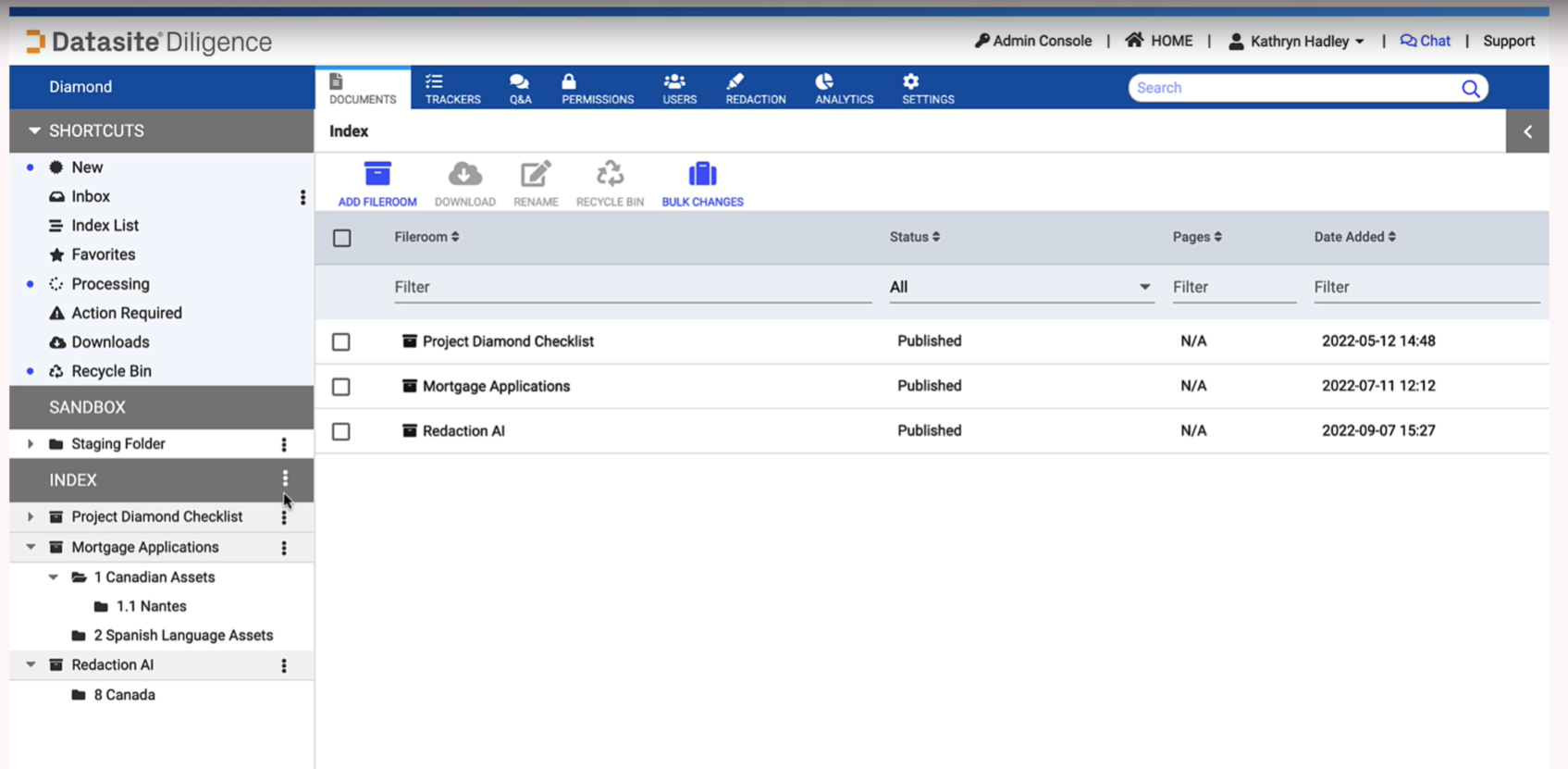
Datasite platform screenshot
Pros
  • Deep AI toolset: redaction, Q&A drafting grounded in deal documents, and MCP for third-party assistants
  • Analytics and reporting go deeper than most competitors
  • Holds up on very large, multi-gigabyte deals
Cons
  • Quote-based pricing, typically tied to page count
  • Interface can feel dated, with a learning curve; may be more than smaller teams need
Best-fit buyer

Investment banks, private equity firms, legal teams and enterprises running large or complex M&A processes.

Pricing style

Enterprise / quote-based

Papermark logoModern VDR provider

3. Papermark

Best for: Startup fundraising, M&A due diligence, private equity, investor relations and secure document sharing.

Papermark is a modern virtual data room for dealmakers, founders and finance teams. It combines controlled access with engagement analytics, branded rooms, granular permissions, dynamic watermarking and NDA agreements.
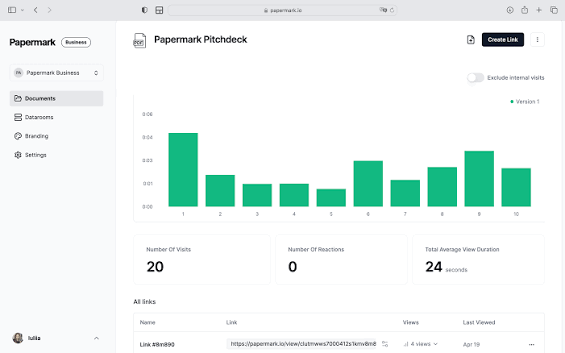
Papermark platform screenshot
Pros
  • Transparent pricing from €99/month and an open-source core with an optional self-hosted route
  • Page-by-page analytics and a fast, self-serve setup
  • MCP server and API for AI agents
Cons
  • Newer than long-established enterprise VDR brands; support can lag
  • Q&A, audit logs, SSO or self-hosting may depend on the plan
Best-fit buyer

Founders, finance teams, advisors and deal professionals who want a modern, branded VDR with clear analytics instead of a heavier legacy platform.

Pricing style

Tiered subscription; VDR plans from €99/month
DealRoom logoM&A workflow platform

5. DealRoom

Best for: M&A project management, due diligence workflows, integration planning and corporate development.

DealRoom is a broader M&A workflow platform with VDR capabilities, built for corporate development, buy-side M&A, diligence and integration. It ties diligence requests to supporting documents.
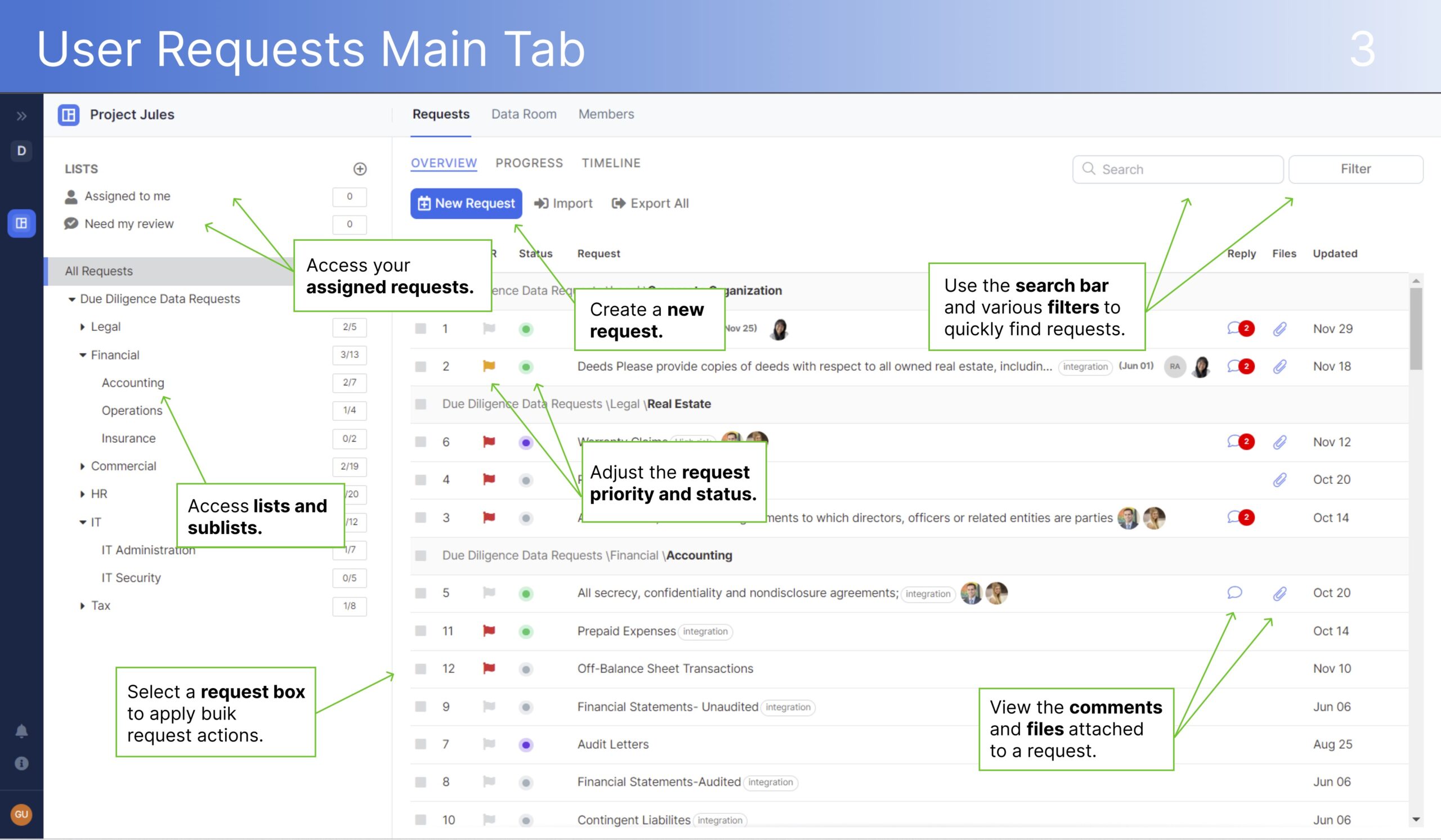
DealRoom platform screenshot
Pros
  • Diligence and post-merger integration live in one workspace, with uploads tied to open requests
  • Predictable flat annual pricing for serial acquirers
Cons
  • Notification volume can get noisy on document-heavy deals
  • A single, one-off deal may not justify the full feature set
Best-fit buyer

Corporate development and buy-side M&A teams that want diligence workflow management alongside secure document sharing.

Pricing style

Flat annual pricing tied to deal volume
ShareVault logoSecure document collaboration

6. ShareVault

Best for: Life sciences, legal, licensing, partnering and document-heavy diligence.

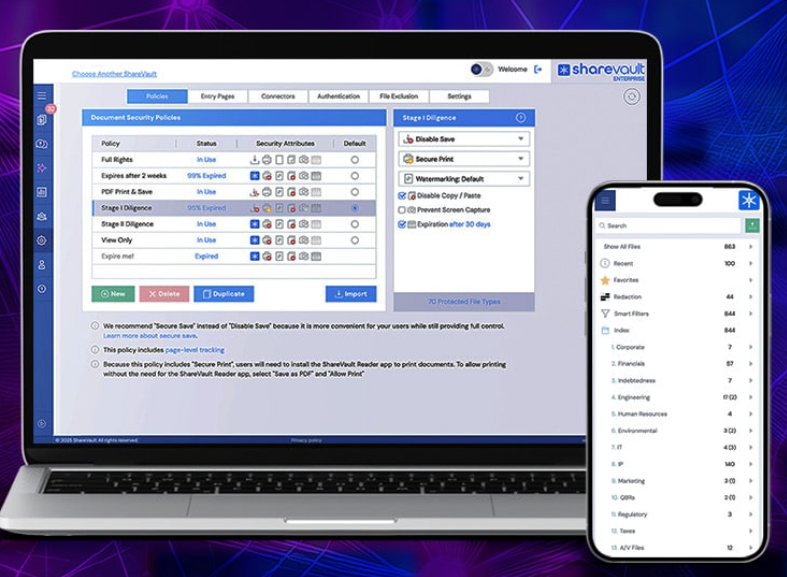
ShareVault is a dedicated VDR for life sciences, legal, licensing, partnering and due diligence, with document control, user activity analytics, AI redaction and structured content organization.
ShareVault platform screenshot
Pros
  • Strong document control, activity analytics and AI redaction
  • 4.6/5 on G2 from about 90 reviews
Cons
  • Quote-based pricing; fit depends heavily on industry and transaction type
Best-fit buyer

Teams running document-heavy diligence, licensing or partnering, especially in life sciences and legal.

Pricing style

Quote-based

Mid-market VDR provider

7. Firmex

Best for: Repeat mid-market deals, diligence, compliance, audits and litigation.

Firmex is a purpose-built VDR designed around time-boxed projects: open a room, run diligence, close and archive. Features include automatic indexing with an Email In address, View As and Copy Project.

Pros
  • Strongest review base here: 4.8/5 on Capterra from 351 reviews
  • 24/7/365 support, frequently praised; flexible single-project and subscription pricing
Cons
  • Quote-based pricing; limited real-time co-editing; mobile less polished than desktop
  • Lighter AI toolset than Datasite, per Firmex's own comparison
Best-fit buyer

Mid-market M&A boutiques, law firms and corporate teams running frequent, clearly time-boxed deals.

Pricing style

Subscription or per-project; quote-based

AI-assisted VDR

8. Ansarada

Best for: AI-assisted deal preparation, capital raising, governance and multi-bidder M&A.

Ansarada leans on AI for preparation, redaction and bidder insight, including the AiDA assistant for sourced answers, AI-Sort, AI-Redact and bidder-engagement prediction.

Pros
  • Broad AI toolset and structured Q&A that keeps buyer questions on record
  • Free until the deal goes live; 4.5/5 on G2 from about 235 reviews
Cons
  • Quote-based pricing (some older comparisons list storage tiers, so confirm current terms)
  • Learning curve; entry storage tiers can fill up fast
Best-fit buyer

Sell-side teams, bankers and executives who want guided preparation and AI-driven bidder insight.

Pricing style

Quote-based; free until go-live

Flat-fee VDR

9. SecureDocs

Best for: Simple VDR projects, quick setup and predictable cost.

SecureDocs states that its deal room starts at $250 per month for unlimited users and unlimited documents, with an about 10-minute setup, which makes it easy to budget for.

Pros
  • Predictable flat fee with unlimited users and documents; fast setup
  • 4.6/5 on G2 from about 50 reviews
Cons
  • Lighter fit for complex enterprise transactions; confirm AI features and support level
Best-fit buyer

Small and mid-size teams, serial acquirers and fundraisers who want a simple, predictable-cost room.

Pricing style

Flat-fee subscription from $250/month

Part of Ideals

10. EthosData

Best for: Buyers who already know the EthosData brand and want its listed plans for M&A, IPOs, fundraising, private equity and legal transactions.

EthosData is part of Ideals. Its pricing page lists Core, Premier and Enterprise plans, says final pricing depends on the project, and says listed plans include unlimited users. Documented controls include AES-256 encryption at rest, SSL/TLS in transit, two-step verification, dynamic watermarks, fence view, granular permissions, IP restrictions and audit logs.

Pros
  • Unlimited users in listed plans; security controls documented on its pricing page
  • Deal-specialist support included with plans, per its Capterra listing
Cons
  • Quote-only pricing and a small review base (4.4/5 from 18 reviews on Capterra)
  • Confirm the current platform, plan details and contracting party
Best-fit buyer

Buyers who want to evaluate through the EthosData team and the Ideals plan structure.

Pricing style

Quote-based; plans by project, administrators, storage and service level

More providers worth shortlisting

FirmRoom is a lean, self-service VDR with flat storage-tier pricing from about $395 per month for 2 GB. A 2026 third-party roundup notes that Fence View and IP restrictions are not included.

DocSend (Dropbox) adds Advanced Data Rooms to its link-tracking tools on higher plans, with per-user pricing. The same roundup notes that deeper redaction and Bates numbering are not part of it.

Digify focuses on protection that follows the file after download, including revoking access and blocking printing or forwarding. Pricing starts around $140 per month billed annually; other comparisons list $190.

Best virtual data room providers by use case

Best virtual data room provider for M&A

Short answer: Ideals, Datasite, Intralinks, DealRoom, Firmex and EthosData are strong options for M&A workflows. Ideals is ranked best overall in this guide because of its broad VDR fit. Datasite and Intralinks are strong for large enterprise transactions. DealRoom is useful when teams need workflow management as well as document sharing. Firmex and EthosData are relevant for teams that want practical transaction support and controlled document access. Ideals’ MCP capability is especially relevant for M&A teams that want to use AI assistants inside the VDR for sell-side and buy-side workflows, such as setting up room structures, checking missing documents, managing bidder access, monitoring engagement, drafting Q&A questions and compiling diligence findings. Datasite offers comparable MCP connectivity for large deals. Read more: Virtual Data Room For M&A: Checklist, Structure, Costs.

Best virtual data room provider for due diligence

Short answer: Ideals, Datasite, Intralinks, Firmex, ShareVault and EthosData are commonly evaluated for due diligence workflows. Compare Q&A workflows, audit logs, indexing, permissions, redaction and reviewer experience, and check whether AI can work directly inside the VDR, as Ideals MCP is designed to do while respecting user access rights. See our guide to the best data rooms for due diligence.

Best virtual data room provider for fundraising

Short answer: Ideals, EthosData, Ansarada, SecureDocs, Papermark and CapLinked are strong options for fundraising workflows. Prioritize investor access, activity tracking, permission control and pricing predictability; Papermark and SecureDocs publish pricing up front. Read also: Virtual data room for startups: investor-ready setup, checklist, and best practices.

Other use cases at a glance

Swipe left to see the full table.
Use caseStrong optionsWhat to prioritizeRead more
IPO preparationIdeals, EthosData, Datasite, IntralinksControlled disclosure, legal review and auditability across bankers, lawyers and auditors.IPO data room
Private equityIdeals, EthosData, Datasite, Firmex, DealRoom, IntralinksRepeat-project workflows, investor reporting, Q&A, permissions and auditability.Private equity data room
Legal teamsIdeals, EthosData, Intralinks, ShareVault, FirmexConfidentiality, access logs, watermarking and role-based access.Legal data room
Real estateDrooms, Ideals, EthosData, FirmexOrganized asset documentation and controlled bidder access; Drooms is strong in European real estate.Real estate data room
Simple secure sharingSecureDocs, CapLinked, FirmRoom, ShareFile, BoxQuick setup and clear entry pricing. ShareFile and Box are not dedicated VDRs.—

Virtual data room pricing comparison

Pricing varies by provider, project size, users, storage, support, security, AI functionality and contract length, so compare the pricing model, not just the headline price. Public price points per provider are in the comparison table above.

Swipe left to see the full table.
Pricing modelHow it worksProsRisks
Per-page pricingCharged by uploaded pagesPredictable for very small document setsExpensive as document volumes grow
Per-user pricingCharged by internal or external usersSimple for small teams and limited reviewer groupsCosts rise as buyers, advisors and investors are added
Storage-based pricingCharged by amount of data storedUseful when user access is broad or unlimitedNeeds realistic storage estimates up front
Project-based pricingCharged per deal or project workspaceSuits M&A, fundraising and defined projectsScope, duration and included features must be clear
Flat monthly subscriptionFixed monthly fee for ongoing accessPredictable budgetingMay not suit short or one-off transactions
Enterprise quote-basedCustom package by users, storage, features and supportFlexible for complex requirementsHard to compare without a sales consultation

Hidden VDR costs to check before you sign

SRS Acquiom’s analysis of more than 3,800 M&A deals, as cited in a 2026 third-party guide, found that actual VDR costs often exceed initial quotes by two to ten times, driven by setup fees and storage overages. Ask every vendor to quote the total, not the headline rate:

  • Setup and onboarding: is room setup included, and is live training limited or unlimited?
  • Storage and overages: what is the cap, and what does each extra gigabyte or page cost?
  • Duration and extensions: what happens if the deal runs past the quoted term?
  • Users and projects: are external users, administrators and additional projects included?
  • Add-ons: are AI features, advanced security, Q&A, 24/7 support and archive exports plan-dependent?

Pricing takeaway: a lower headline price does not always mean a lower total cost. Read the full VDR pricing comparison

Are there virtual data rooms with free trials?

Yes. Many providers offer a free trial, free demo, trial by request or a free setup period; the comparison table above shows each one. Terms vary: Ansarada is free until the deal goes live, and Ideals says a trial room can be used for live transactions and converted to a subscription. Before starting, confirm what the trial includes (full functionality, external users, Q&A, audit logs, storage and user limits, support, exports) and verify terms with the provider.

Virtual data room provider reviews: what buyers should look for

Focus on recurring themes in reviews instead of star ratings alone, and read them together with product documentation and pricing pages, because reviews can reflect older versions or plan names.

Swipe left to see the full table.
What to checkPositive signalWarning sign
Setup speedRoom launches quickly with clear onboarding.Setup requires heavy manual work.
Support24/7 support and live transaction help.Slow support during active deals.
External user experienceBuyers, investors and advisors access files easily.Reviewers struggle with login or navigation.
PermissionsAdmins easily control view, download and print rights.Permissions are confusing or error-prone.
PricingUser, storage, project and support costs are clear.Extra fees are discovered late.
Q&A and searchQuestions are assigned, tracked and exported; documents are easy to find.Q&A is manual or search performs poorly on large sets.
Audit logs and archiveActivity and completed rooms can be exported.Reporting is limited or export and archive fees are unclear.
AI toolsAI reduces manual review, redaction or search work.AI features are unclear, limited or sold separately.

Virtual data room provider ratings and review counts

We recorded each provider’s visible rating, review count and source from public review platforms. A 4.7 rating from hundreds of reviews is not directly comparable to a similar rating from only a few, so use ratings as one signal among several.

Swipe left to see the full table.
ProviderReview sourceRatingReview countConfidence
Ideals Virtual Data RoomG2 reviews4.7 / 5806 reviewsHigh
Datasite DiligenceG2 reviews4.4 / 5397 reviewsHigh
AnsaradaG2 reviews4.5 / 5235 reviewsHigh
ShareVaultG2 reviews4.6 / 592 reviewsMedium
DealRoomG2 reviews4.3 / 566 reviewsMedium
SecureDocs Virtual Data RoomG2 reviews4.6 / 550 reviewsMedium
Intralinks VDRProG2 reviews3.8 / 530 reviewsLow
Firmex Virtual Data RoomCapterra reviews4.8 / 5351 reviewsHigh
EthosDataCapterra reviews4.4 / 518 reviewsLow
DroomsG2 seller profile4.7 / 53 reviewsLow

Ratings last checked in October 2026 on public G2 and Capterra pages. Platforms update continuously, so confirm current ratings and recent feedback before deciding.

Security features to compare in virtual data room providers

Security is one of the main reasons companies choose a virtual data room over generic file sharing. Compare encryption at rest and in transit, multi-factor or two-step verification, granular permissions, dynamic watermarks, fence view, IP restrictions, audit logs, SSO, compliance certifications and archive exports. Ideals highlights encryption, multi-factor authentication, watermarking, IP and domain restrictions and granular permissions in its help center, and EthosData’s pricing page lists AES-256, SSL/TLS, two-step verification, fence view and compliance standards including SOC, ISO 27001, GDPR, HIPAA and PCI DSS. For AI-enabled workflows, also check whether AI activity follows the same permissions and audit trail as human users. Read more about virtual data room security.

Where your data lives: hosting regions and data residency

Hosting determines which data-protection rules apply, so ask early. Ideals says it runs data centers in nine regions, Drooms positions European hosting, and Papermark offers an optional self-hosted route. Some vendors also publish single-tenant or bring-your-own-storage deployments; DocullyVDR Private is one example. Ask which region stores your live room, backups, logs and support data, and whether you can choose it at setup.

AI capabilities in virtual data room providers

Useful AI features include document search, chat with documents, redaction, translation, auto-indexing, Q&A drafting and document classification. MCP (Model Context Protocol) connects an approved AI assistant to the VDR so it can search, analyze and take permitted actions while the room’s permissions and audit trail stay in force. It is not unique to one vendor:

Swipe left to see the full table.
ProviderAI and MCP capabilities (per vendor materials and 2026 third-party reviews)
IdealsMCP connectivity so teams can work with Claude, ChatGPT or Copilot inside the room, under existing permissions and audit trails
DatasiteMCP support for Claude, ChatGPT and Copilot, AI redaction and Q&A drafting grounded in deal documents
PapermarkMCP server and API that let agents create rooms, upload documents and pull analytics, while respecting permissions
AnsaradaAiDA search assistant, AI-Sort, AI-Redact and bidder-engagement prediction
IntralinksAI redaction and AI-supported deal tools
ShareVaultAI redaction and smart search

If your organization restricts AI: some buyers, especially in regulated sectors, prohibit AI processing of deal documents, and at least one vendor, DocullyVDR, publishes a no-AI pledge. Ask whether AI can be disabled, whether any AI service processes your content, and whether documents are used for model training. Related reading: AI in M&A: The 5-Layer Value Stack That Will Define Dealmaking in 2026–2030.

Are Box, Google Drive and Dropbox virtual data room providers?

No. Google Drive and Dropbox are cloud storage and file-sharing platforms, and Box is a content management platform. They work for basic sharing, but usually lack deal-specific Q&A, granular disclosure workflows and transaction support. A middle path exists: some products add data-room controls on top of Google Drive, Dropbox or Microsoft 365, which can suit teams that want files to stay in tools they already use. Check which audit trail, permissions and support you actually get, and prefer a dedicated VDR for M&A, IPO preparation, fundraising, legal review or regulated diligence.

Swipe left to see the full table.
RequirementDedicated VDRCloud storage
M&A due diligenceYesLimited
Granular external permissionsStrongVaries
Q&A workflowUsually includedUsually not included
Audit trailDetailedLimited or configuration-dependent
Watermarks and fence viewCommonLimited or unavailable
Buyer activity analyticsCommonLimited
Suitable for IPO or regulated diligenceYes, depending on providerUsually not ideal

Virtual data room provider checklist

Run through this list before any provider goes live on a transaction, and test the reviewer experience yourself.

Pricing and scalability
Are users unlimited, and how is storage priced?
Prevents access costs and overage fees from rising unexpectedly.
Are AI features included or add-ons?
Affects cost and workflow.
Diligence and security
Are Q&A workflows included, and are audit logs exportable?
Important for diligence, compliance and deal records.
Does the platform support dynamic watermarks, SSO and group permissions?
Protects confidential documents and reduces administrative risk.
AI connectivity and governance
Does it support secure AI connectivity such as MCP, and can AI only reach documents the user may see?
Lets teams use AI without moving sensitive documents into unmanaged tools.
Are AI actions captured in the audit trail, and can AI be switched off?
Supports accountability, or compliance with a no-AI policy.
Support and reviewer experience
Is 24/7 support included?
Critical during live transactions.
Is the platform easy for external reviewers and admins?
Improves buyer and investor experience.

Virtual data room glossary

Q&A workflow
A structured system for asking, assigning, answering and exporting diligence questions.
Audit trail
A record of user activity, document access and permission changes.
Dynamic watermark
A visible mark on documents showing user, email, time or access details.
Fence view
A secure viewing feature that limits how much of a document is visible at once.
Redaction
Removing or hiding sensitive information before documents are shared.
MCP
Model Context Protocol; an open standard that connects AI tools to a data room so users can search, analyze and take permitted actions while preserving permissions and audit controls.

FAQ

What are virtual data room providers?
Virtual data room providers offer secure online platforms for storing, sharing, reviewing and tracking confidential documents, commonly for M&A, due diligence, fundraising, IPOs, audits, legal matters and compliance.
Who are the top virtual data room providers in 2026?
Top providers include Ideals (iDeals), Datasite, Intralinks, DealRoom, Firmex, ShareVault, Ansarada, Papermark, Drooms, SecureDocs, CapLinked and EthosData, which is part of Ideals. Box, Google Drive and Dropbox are file-sharing alternatives, not dedicated VDRs by default.
What is the best virtual data room provider overall?
Ideals is the best overall provider in this guide, based on M&A fit, due diligence workflows, security, permissions and support. EthosData is part of Ideals, so weigh that relationship; the methodology section explains how we ranked providers.
Is EthosData part of Ideals?
Yes. EthosData has announced that it was acquired by Ideals, and its plans follow the Ideals Core, Premier and Enterprise structure. Confirm the current platform, plan details and contracting party during vendor evaluation.
Which virtual data room provider is best for M&A?
Ideals, Datasite, Intralinks, DealRoom, Firmex and EthosData are strong options. Datasite and Intralinks suit large enterprise deals, while DealRoom is useful when workflow management is also required.
Which virtual data room provider is best for fundraising?
Ideals, EthosData, Ansarada, SecureDocs, Papermark and CapLinked are commonly considered. Prioritize investor access, activity tracking, permission control and pricing predictability.
How much do virtual data room providers cost?
Providers charge by page, user, storage, project, monthly subscription or custom quote. Public price points run from about $75 to $250 per month for lightweight and flat-fee options up to custom enterprise quotes. Final pricing depends on projects, administrators, storage, support, security, AI features and contract length.
What AI features do virtual data room providers offer, and what is MCP?
Features may include document search, chat with documents, AI redaction, translation, auto-indexing and AI-assisted Q&A. MCP connects AI assistants to a data room so users can search and act without uploading files into separate tools. Ideals, Datasite and Papermark have all described MCP support.
Is Google Drive, Dropbox or Box a virtual data room provider?
No. They are cloud storage and content-management platforms. They suit basic collaboration, but dedicated VDRs add deal-specific Q&A, audit trails, watermarks and secure viewing for M&A, fundraising, IPO and regulated diligence.
Which is better: Ideals, Datasite or Intralinks?
Ideals is a strong overall choice across M&A, fundraising, due diligence, legal and enterprise use. Datasite is often considered for large M&A and investment banking deals, and Intralinks for regulated enterprise transactions. The best choice depends on deal size, workflow complexity, support expectations and pricing model.

Conclusion: choosing the right virtual data room provider

The best virtual data room provider depends on the transaction, team, security requirements, support expectations and pricing model. Ideals is a strong overall choice for global VDR workflows; Datasite and Intralinks suit large enterprise and regulated deals; DealRoom suits teams that need M&A workflow management; Firmex suits repeat mid-market deals; ShareVault suits document-heavy diligence; Ansarada suits AI-assisted deal preparation; Papermark and SecureDocs suit teams that want transparent, predictable pricing; and Drooms is strong for European real estate. EthosData is relevant for buyers who want its listed plans, which follow the Ideals structure.

For serious M&A, IPO preparation, fundraising, legal review or regulated due diligence, choose a dedicated provider with strong security, granular permissions, audit trails, Q&A, reliable support and a pricing model that fits the project.

Last reviewed: October 2026
Pricing accuracy note: Public pricing and packaging can change. Confirm users, storage, administrators, AI features, support level, archive exports and contract terms directly with each provider before purchase.

Create your data room now

Best Virtual Data Room Providers in 2026: Pricing, Features, Reviews & Use Cases Compared2026-10-12T13:31:24+00:00

Best Virtual Data Rooms for M&A in 2026: 8 Providers Compared

Choosing the best data rooms for M&A means finding a platform that protects confidential documents without slowing down buyers, sellers, advisors, or legal teams. The right virtual data room should also support the workflows that distinguish a live transaction from ordinary file sharing, including bidder separation, granular permissions, structured Q&A, reporting, and a reliable post-close record.

There is no single platform that fits every transaction. A competitive sell-side auction has different requirements from a recurring buy-side acquisition program or a smaller bilateral deal. This guide compares eight established virtual data rooms for mergers and acquisitions based on M&A functionality, pricing approach, security controls, workflow capabilities, and suitability for different deal types.

Last reviewed: September 2026.

Quick answer

For M&A due diligence, shortlist providers according to the transaction rather than the length of their feature lists. Ideals / EthosData is suited to controlled sell-side and buy-side diligence; Datasite and Intralinks are strong candidates for large or complex enterprise deals; DealRoom is differentiated by broader M&A workflow management; Firmex works well for recurring projects; and Ansarada, Drooms, and CapLinked offer different combinations of AI, pricing transparency, and transaction controls.

Key takeaways
  • Ideals / EthosData: detailed permissions, Q&A, redaction, reporting, and support for controlled M&A due diligence.
  • Datasite: large, document-intensive M&A processes and AI-assisted review.
  • Intralinks: enterprise transactions and clean-team workflows.
  • DealRoom: corporate development teams combining diligence with project management.
  • Firmex: advisors and organizations that run recurring mid-market projects.
  • Ansarada: AI-assisted preparation, document review, and Q&A.
  • Drooms: European and document-heavy transactions with flexible plan structures.
  • CapLinked: smaller and mid-sized deals that benefit from published starting prices and post-download controls.

Best data rooms for M&A at a glance

The table below is designed as a shortlisting tool. Pricing and feature availability can change by plan, region, project size, and contract, so buyers should confirm current terms directly with each provider.

Scroll horizontally to view the full table.
ProviderBest suited toKey M&A differentiatorPricing approach
Ideals Visit website EthosData Get a quoteSell-side and buy-side M&A, advisors, cross-border dealsGranular permissions, structured Q&A, redaction, reporting, and supportStorage and usage-based plans
DatasiteLarge enterprise and investment-bank-led transactionsM&A-specific workflow with AI-assisted document reviewCustom quote
IntralinksRegulated and complex multi-party transactionsEnterprise access controls and clean-team Q&A workflowsCustom quote
DealRoomCorporate development and recurring acquisitionsVDR, diligence requests, tasks, and pipeline workflow in one platformDeal-volume-based subscription
FirmexMid-market advisors and repeat projectsSingle-project and annual subscription modelsCustom project or annual pricing
AnsaradaAI-assisted preparation and mid-market dealsAI-supported Q&A, document organization, and reviewPublished storage-based plans
DroomsEuropean M&A and document-heavy transactionsFlexible data room plans with Q&A, governance, and AI toolsStorage and user-based plans
CapLinkedSmall and mid-sized transactionsDRM controls, Q&A, unlimited guest users on selected plansMonthly or enterprise subscription

How we evaluated M&A data rooms

This comparison focuses on capabilities that matter during a live transaction rather than the total number of features on a provider's website. We used seven criteria to assess how well each platform supports M&A due diligence.

1. Access control Buyer groups and permissions at group, folder, document, or transaction-stage level.
2. Document security Watermarking, secure viewing, protected downloads, redaction, and access revocation where supported.
3. Due diligence Q&A Question routing, internal review, approvals, buyer-group separation, and Q&A history.
4. Document management Bulk upload, indexing, OCR, search, version control, and handling of large document sets.
5. Reporting Visibility into user activity, document views, downloads, permissions, and audit records.
6. M&A workflow Support for preparation, bidder management, diligence, negotiation, and closing rather than storage alone.
7. Commercial model How the provider charges for storage, projects, users, duration, support, or additional services.
Disclosure: EthosData is part of Ideals. This comparison therefore treats EthosData and Ideals as one provider relationship rather than presenting them as independent competing platforms.

Top virtual data rooms for mergers and acquisitions in 2026

The following profiles focus on what makes each provider different in an M&A context. Each section includes the strongest use case, pricing approach, and an important limitation or point to confirm before signing a contract.

For controlled sell-side and buy-side diligence

Ideals / EthosData

Ideals is a strong fit for M&A teams that need detailed disclosure controls without making the room difficult for occasional external reviewers to use. EthosData is now part of Ideals, so teams evaluating EthosData should confirm which Ideals platform, plan, contracting entity, and service model will apply to the project.

Ideals supports multiple document permission levels and allows administrators to assign permissions by group across folders and files. Depending on the permission applied, teams can restrict downloading, printing, and access to protected documents. The platform also includes structured Q&A, document redaction, and permissions reporting.

Best for

  • Sell-side auctions.
  • Buy-side due diligence.
  • Investment banks and M&A advisors.
  • Private equity and cross-border deals.

Why it stands out

Detailed document permissions, structured Q&A, redaction, reporting, and support make it suitable for transactions where disclosure controls change as the deal progresses.

Pricing

Storage and usage-based plans. Buyers should confirm included storage, overage rates, Q&A availability, AI features, archives, and support.

Point to confirm

Teams that only need basic file sharing may not require the full range of M&A-specific controls.

Distinctive M&A use case: Controlled disclosure across several buyer or advisor groups, especially when permissions, Q&A, and audit records need to be managed centrally.

Product documentation: permissions, redaction, and permissions log.

For large and document-intensive M&A

Datasite

Datasite Diligence is purpose-built around M&A due diligence and is particularly relevant to investment banks, enterprise sellers, and deal teams handling large document sets.

Datasite combines conventional VDR functionality with AI-assisted review tools. Its current product materials describe semantic search, document summaries, clause explanations, Q&A assistance, document comparison, automated redaction, and translation.

Best for

  • Large enterprise transactions.
  • Investment-bank-led sell-side processes.
  • Large document collections.
  • Teams using managed transaction services.

Why it stands out

M&A-specific workflows and AI-assisted document review make Datasite particularly relevant when transaction scale and document volume are high.

Pricing

Custom quotation based on transaction scope, requirements, and timeline.

Point to confirm

Smaller transactions should compare the cost and implementation requirements with simpler VDR options.

Distinctive M&A use case: Large, document-heavy transactions where the deal team values an enterprise M&A platform and AI-assisted review.

Product documentation: Datasite Diligence.

For clean teams and regulated transactions

Intralinks

Intralinks is an established enterprise VDR used for M&A, private equity, financing, and other sensitive transactions. Its clearest differentiator for complex M&A is support for clean-team workflows.

Intralinks VDRPro supports buyer groups, granular access controls, protected files, printing restrictions, secure downloads, watermarks, and structured Q&A. Clean-team users can submit questions with restricted visibility so competitively sensitive discussions remain limited to authorized participants.

Best for

  • Large cross-border M&A.
  • Private equity transactions.
  • Regulated deals.
  • Clean-team processes.

Why it stands out

Clean-team Q&A and enterprise controls are useful where competitively sensitive information cannot be disclosed broadly to a bidder's operating team.

Pricing

Custom quotation. Confirm how data volume, users, support, and extensions affect the contract.

Point to confirm

The depth of configuration may be unnecessary for smaller bilateral transactions with straightforward disclosure needs.

Distinctive M&A use case: Transactions requiring clean-team separation and enterprise-grade controls around sensitive information.

Product documentation: VDRPro setup and clean teams in Q&A.

For corporate development and recurring acquisitions

DealRoom

DealRoom differs from conventional VDRs because it combines document sharing with diligence requests, tasks, pipeline management, and integration planning. This makes it particularly relevant to corporate development teams managing repeated acquisitions.

Instead of keeping a diligence request list in spreadsheets while supporting files sit in a separate repository, DealRoom connects requests, documents, Q&A, and project tasks within the same workflow.

Best for

  • Corporate development.
  • Recurring buy-side M&A.
  • Serial acquirers.
  • Diligence request management.

Why it stands out

The platform addresses the coordination problem around diligence, not only the document-sharing problem.

Pricing

Deal-volume-based subscription. DealRoom states that selected plans include unlimited users and data storage.

Point to confirm

A company running one simple sell-side process may not need the wider project-management functionality.

Distinctive M&A use case: Buy-side teams that want requests, documents, ownership, tasks, and progress tracking in one environment.

Product documentation: DealRoom pricing and plans.

For repeat mid-market transactions

Firmex

Firmex is a purpose-built VDR used for M&A, legal work, compliance, and other confidential projects. One of its clearer differentiators is the option to choose between a single-project room and an annual subscription for recurring use.

That structure can be useful for investment banks, law firms, consultants, and corporate teams that open several data rooms each year but do not need a broader M&A operating system.

Best for

  • Mid-market M&A.
  • Advisors and law firms.
  • Repeat due diligence projects.
  • Recurring confidential workflows.

Why it stands out

Single-project and annual subscription options give recurring users more flexibility than a one-off-only commercial model.

Pricing

Custom project or annual subscription pricing based on project duration and expected data requirements.

Point to confirm

Teams prioritizing extensive AI automation or full M&A pipeline management should compare Firmex with more workflow-heavy platforms.

Distinctive M&A use case: Advisors and mid-market teams that need reliable VDR controls across one project or many recurring projects.

Product documentation: Firmex pricing.

For AI-assisted deal preparation

Ansarada

Ansarada combines a virtual data room with AI-supported preparation, document review, Q&A, and transaction management. Its published pricing also makes early cost comparison easier than with providers that disclose pricing only after a sales consultation.

Current plans are primarily storage-based rather than user-based. The platform includes granular document security, tasks, workflows, and AI functionality, with additional capabilities available on higher plans.

Best for

  • Mid-market M&A.
  • AI-assisted preparation.
  • Large diligence request lists.
  • Teams wanting published pricing.

Why it stands out

AI-supported organization, Q&A, document review, and public pricing information create a clearer evaluation path before a sales conversation.

Pricing

Published storage-based plans with term-based discounts. Verify current pricing before purchase.

Point to confirm

Check exactly which AI and Q&A capabilities are included in the selected plan.

Distinctive M&A use case: Deal teams that want AI-assisted preparation and a more transparent starting point for pricing comparison.

Product documentation: Ansarada pricing guide.

For European and structured transaction workflows

Drooms

Drooms is an established VDR option for M&A and other document-intensive transactions, with a particularly visible presence in European markets. The provider offers online subscription plans alongside tailored enterprise configurations.

Higher plan tiers add functionality such as Q&A, advanced reporting, governance controls, readiness tracking, redaction, document translation, and broader AI features.

Best for

  • European M&A.
  • Document-heavy transactions.
  • Real estate-linked deals.
  • Repeat data room use.

Why it stands out

Flexible plan structures create an upgrade path from secure document sharing to more advanced transaction workflows.

Pricing

Published subscription tiers based on storage, users, and functionality, plus custom enterprise configurations.

Point to confirm

Features differ materially between tiers, so confirm whether Q&A, AI, advanced permissions, and premium services are included.

Distinctive M&A use case: European deal teams that want a tiered product structure and may expand from basic secure sharing into more advanced transaction functionality.

Product documentation: Drooms pricing.

For predictable pricing and post-download control

CapLinked

CapLinked provides secure data rooms for due diligence and other confidential business processes. Its main differentiators are relatively transparent pricing and digital rights management for downloaded documents.

Its Team plan includes permission-based access, watermarking, activity reporting, OCR search, Q&A, and unlimited guest users. FileProtect can require users to authenticate before opening protected downloaded files and can support revocation or expiration controls.

Best for

  • Small and mid-sized transactions.
  • One-off due diligence projects.
  • Teams comparing published starting prices.
  • Deals requiring DRM-protected downloads.

Why it stands out

Published entry pricing and post-download controls provide two concrete differentiators that are easy to evaluate before a demo.

Pricing

Monthly Team and customized Enterprise plans. Check current pricing at the time of purchase because published rates can change.

Point to confirm

Very large investment-bank-led transactions should compare enterprise workflow depth and managed-service requirements with larger M&A platforms.

Distinctive M&A use case: Smaller and mid-market deals where predictable cost and control over downloaded files are priorities.

Product documentation: CapLinked pricing.

Which M&A data room fits your deal?

A provider shortlist becomes easier once the transaction structure is clear. The following scenarios show where each platform's most visible differentiators may matter.

Competitive sell-side auction Consider Ideals, Datasite, or Intralinks when bidder separation, permissions, Q&A, and reporting are central.
Large enterprise transaction Datasite, Intralinks, and Ideals are relevant where scale, document controls, support, and complex workflows matter.
Clean-team process Intralinks is particularly relevant because it documents dedicated clean-team Q&A functionality.
Recurring corporate acquisitions DealRoom and Firmex address repeat-deal needs through workflow management or recurring subscription models.
AI-heavy document preparation Datasite, Ansarada, Drooms, and Ideals all offer AI-assisted functionality, although the specific tools and plan availability differ.
Published pricing as an early filter Ansarada, Drooms, and CapLinked provide more public pricing information than providers that rely entirely on custom quotations.

This is a shortlisting guide, not a substitute for testing a platform. Before a live transaction, create a sample project using your own folder structure, permission groups, and expected document volume.

What features matter most in an M&A data room?

The strongest M&A data rooms do more than store confidential files. They help control how information moves between sellers, buyers, advisors, lenders, and specialists throughout due diligence.

Granular permissions and bidder separation

A sell-side process may involve several potential buyers reviewing the same core materials while receiving different access to sensitive documents. The VDR should support separate groups and permission changes without forcing administrators to rebuild the room.

Structured Q&A

A dedicated Q&A module should route questions to internal experts, support review before release, control which bidder can see each response, and preserve the final Q&A history.

Audit trails and activity reporting

Useful reporting can include document access, downloads, permission changes, and Q&A activity. These records create a clearer operational history of disclosure during the deal.

Document protection

Administrators should be able to control whether a file can be viewed, printed, or downloaded. Watermarking, protected viewing, and post-download controls can add further safeguards for sensitive materials.

Search, OCR, and indexing

Automatic indexing, OCR, full-text search, bulk upload, and consistent numbering help reviewers navigate large document sets without repeatedly asking where information is located.

Pricing that matches the transaction

Compare total expected cost rather than the headline rate. Check storage, users, administrators, project duration, extensions, support, archive delivery, and any AI or managed-service charges.

Virtual data room vs. general cloud storage for M&A

General cloud storage can be sufficient during early internal preparation. The requirements change once external buyers and advisors begin reviewing confidential information in a live transaction.

Scroll horizontally to view the full table.
General cloud storageM&A virtual data room
Designed for everyday file storage and collaborationDesigned for confidential transaction workflows
Basic file and folder sharingGranular bidder and document permissions
Activity tracking varies by platform and configurationDetailed user and document activity reporting
Q&A is usually managed in another toolStructured due diligence Q&A can be built into the platform
Basic download controlsWatermarking, secure viewing, protected downloads, or revocation depending on provider
Useful for internal preparation and routine collaborationBetter suited to external buyer review and staged disclosure

How virtual data rooms support mergers and acquisitions

A data room supports several stages of the transaction rather than only the initial document upload. This is why dedicated VDRs should be evaluated as transaction infrastructure rather than simply secure storage.

Preparation. Sellers collect financial, legal, tax, HR, commercial, and technical documents, remove duplicates, build an index, and identify materials that require restricted access.
Buyer onboarding. Bidders and advisors are assigned to groups with permissions appropriate to their role and stage of the process.
Due diligence. Reviewers examine the business and submit requests or questions about missing, unclear, or higher-risk information.
Q&A. Questions are routed to internal subject-matter experts and approved before answers are released to the relevant bidder.
Negotiation and signing. Updated documents, disclosure materials, transaction agreements, and supporting schedules can be released as negotiations progress.
Closing and archive. The final room, Q&A history, activity reports, and relevant transaction documents can be retained or exported according to the provider's archive process.

Common documents stored in an M&A data room

The exact index depends on the company, industry, transaction structure, and diligence scope. Sensitive customer information, employee data, pricing information, source code, or competitively sensitive commercial materials may require staged disclosure, redaction, or clean-team access.

Scroll horizontally to view the full table.
CategoryCommon documentsMain diligence purpose
CorporateArticles, bylaws, board minutes, shareholder agreements, cap tableConfirm ownership, governance, and authority
FinancialFinancial statements, management accounts, forecasts, debt schedulesEvaluate performance, cash flow, and financial risk
TaxTax returns, correspondence, indirect tax records, transfer pricing filesIdentify tax exposures and compliance issues
LegalMaterial contracts, litigation, licenses, leasesReview obligations, disputes, and change-of-control provisions
HREmployee lists, compensation, benefits, employment agreementsAssess workforce obligations and retention issues
IP and technologyPatents, trademarks, licenses, software documentation, cybersecurity materialsConfirm ownership and identify technology or security risks
CommercialCustomer data, pipeline, churn, supplier informationAssess revenue quality and concentration
OperationsInsurance, facilities, procedures, supplier recordsReview operational continuity and scalability

How to choose the best M&A data room

Start with the transaction rather than the provider's feature list. For a competitive auction, bidder separation and controlled Q&A may be critical. For a corporate development team completing several acquisitions each year, workflow and repeat-project economics may matter more.

  • Estimate document volume and expected transaction duration.
  • Identify how many bidder, advisor, and internal groups need separate permissions.
  • Test the Q&A workflow using a realistic diligence scenario.
  • Upload several large folders to evaluate indexing, search, and permissions.
  • Review security and compliance documentation rather than relying on broad claims.
  • Ask how access and permission changes are recorded and exported.
  • Confirm storage overages, project extensions, archives, support, and additional modules.
  • Check how quickly access can be revoked if a bidder leaves the process.
  • Understand how AI tools process deal documents and whether outputs link back to source material.
  • Confirm what happens to the data room after signing or closing.

Final comparison

There is no universal M&A data room for every transaction. Ideals / EthosData is well suited to teams that need detailed permissions, Q&A, reporting, and document controls across controlled due diligence. Datasite is particularly relevant to large, document-intensive transactions, while Intralinks is differentiated by clean-team functionality for sensitive enterprise deals.

DealRoom stands apart through broader corporate-development workflow management. Firmex is practical for recurring projects, while Ansarada and Drooms combine VDR functionality with expanding AI capabilities. CapLinked is worth comparing where published starting prices and DRM-protected downloads are priorities.

The most reliable way to choose among the best data rooms for M&A is to shortlist providers according to the transaction and then test the workflows that actually matter: permissions, Q&A, search, reporting, bidder separation, and closing archives.

Evaluating an M&A data room?

Compare your expected storage, users, bidder groups, Q&A requirements, support needs, and transaction timeline before requesting a final quote.

Request a proposal

FAQs about M&A data rooms

What is an M&A data room?

An M&A data room is a secure online workspace used to organize, share, and review confidential documents during a merger, acquisition, divestiture, or similar transaction. Sellers use it to control disclosure, while buyers and advisors use it to conduct due diligence.

What are the best data rooms for M&A in 2026?

Commonly shortlisted M&A data room providers include Ideals / EthosData, Datasite, Intralinks, DealRoom, Firmex, Ansarada, Drooms, and CapLinked. The appropriate provider depends on deal size, bidder count, document volume, Q&A requirements, security controls, pricing model, and support.

What are virtual data rooms for mergers and acquisitions used for?

Virtual data rooms for mergers and acquisitions are used to prepare documents, manage buyer access, conduct due diligence, organize Q&A, monitor document activity, and maintain transaction records. They replace scattered email attachments and basic file-sharing links with a controlled deal workspace.

Why are virtual data rooms important in M&A?

M&A transactions require companies to disclose large volumes of confidential information to outside parties. A VDR helps administrators control who can access each document, track activity, manage buyer questions, and change permissions as the transaction progresses.

What should an M&A virtual data room include?

Important capabilities include granular permissions, bidder groups, document watermarking, view and download controls, structured Q&A, audit logs, full-text search, OCR, bulk upload, activity reporting, and secure post-close archiving. The exact requirements depend on the deal.

What is the difference between an M&A data room and Dropbox, Box, or SharePoint?

General cloud platforms are designed primarily for everyday file storage and collaboration. A purpose-built M&A data room usually adds transaction-specific controls such as bidder separation, detailed audit trails, document-level restrictions, structured Q&A, staged disclosure, and deal-specific reporting.

How much does an M&A data room cost?

Pricing varies by provider. Common models include storage-based pricing, fixed project fees, monthly subscriptions, annual subscriptions, user-based charges, and custom enterprise quotes. Teams should compare the total expected cost, including overages, extensions, support, AI modules, and archive delivery.

How long should an M&A data room stay open?

The room normally remains active throughout due diligence, negotiation, signing, and any period required for closing activities. After the transaction, teams may close external access and retain an archive of relevant documents, Q&A, and activity records according to legal and record-retention requirements.

Can several bidders use the same M&A data room?

Yes. Purpose-built VDRs can place bidders in separate groups and apply different permissions to each group. Sellers should test bidder isolation, Q&A visibility, and document-level permissions before opening a competitive process.

Virtual data room for M&A deals

Best Virtual Data Rooms for M&A in 2026: 8 Providers Compared2026-09-22T13:14:03+00:00

Data Room Security: What a Secure Virtual Data Room Must Deliver in 2026

Companies use virtual data rooms to share some of their most sensitive information with buyers, investors, lawyers, advisers, auditors, and other external parties. Financial records, contracts, intellectual property, employee information, customer data, and transaction documents may all pass through the same workspace.

Strong virtual data room security therefore requires more than encrypting stored files. Administrators need to control who can enter the room, what each participant can see, what they can do with documents, when their access ends, and how their activity is recorded.

EthosData became part of Ideals in 2024. EthosData customers now use the Ideals virtual data room platform, combining EthosData's transaction support with Ideals' permission controls, document security, reporting, infrastructure, and compliance framework. Read more about the EthosData acquisition by Ideals.

EthosData security at a glance: The Ideals platform behind EthosData combines AES-256 encryption, two-step verification, eight document permission levels, Fence View, dynamic watermarks, protected downloads, audit trails, AI-assisted redaction, data-hosting controls, and enterprise security options.

EthosData virtual data room security features

EthosData uses a layered security model. Each layer addresses a different risk, from unauthorized account access to legitimate users receiving more document access than they need.

Encryption

AES-256 encryption protects stored data, while TLS protects files during transmission between users and the platform.

Identity security

Two-step verification, email verification, password controls, session settings, and enterprise SSO help protect user accounts.

Granular permissions

Eight document permission levels let administrators control how separate user groups can interact with confidential files.

Document protection

Fence View, dynamic watermarks, encrypted downloads, and spreadsheet controls provide additional protection after access is granted.

Auditability

Detailed activity records help administrators monitor user behavior and maintain an auditable record of disclosure.

Infrastructure security

Data residency options, redundancy, backup, disaster recovery, and secure hosting support business continuity during live transactions.

Swipe left to see the full table.
Security areaEthosData / Ideals capabilityWhy it matters
EncryptionAES-256 at rest and TLS in transitProtects confidential information while stored and transferred.
AuthenticationTwo-step verification and additional identity controlsReduces reliance on passwords alone.
PermissionsEight document permission levelsLets administrators control disclosure by participant group and document.
Document protectionFence View, watermarks, protected downloads, spreadsheet controlsLimits what authorized users can do with sensitive information.
Access restrictionsAccess schedules, expiration, IP and domain restrictionsHelps restrict where, when, and for how long users can access a project.
MonitoringDetailed audit trails and activity reportingProvides visibility into user and document activity.
AI protectionAI-assisted redaction within the secured platform environmentHelps identify sensitive information before disclosure.
Enterprise controlSSO and centralized multi-project administration on applicable plansSupports consistent security across larger deal programs.

What is virtual data room security?

Virtual data room security is the combination of technical and administrative controls used to protect confidential information throughout a transaction or other sensitive business process. It includes encryption, identity verification, permissions, document-level controls, monitoring, secure infrastructure, and procedures for changing or revoking access.

A VDR differs from general-purpose cloud storage because it is designed for controlled disclosure. The objective is not simply to store a file securely. It is to control how external participants interact with that file throughout its lifecycle.

Virtual data room security is strongest when encryption, identity controls, granular permissions, document protection, and auditability work together rather than as separate features.

For a broader look at confidential file exchange, see our guide to secure file sharing for business.

Encryption of data in transit and at rest

Encryption forms the technical foundation of EthosData security. The Ideals platform protects stored files with 256-bit AES encryption and uses TLS to protect data during transmission.

These controls address separate risks. Encryption at rest protects information stored within the platform. Encryption in transit protects information while it moves between the user's device and the VDR.

However, encryption alone does not determine whether a transaction is secure. An encrypted document may still be exposed if too many users receive access, unrestricted copies are downloaded, or stale accounts remain active. EthosData therefore combines encryption with permissions, authentication, document controls, and monitoring.

Security principle: Encryption protects the underlying data, while permissions and document controls determine how that data can be used after an authorized participant receives access.

Granular permissions and access controls

Access control is one of the strongest areas of the Ideals platform behind EthosData. Administrators can organize users into groups and assign different permissions according to the information each group needs.

Ideals provides eight document permission levels:

  1. No access
  2. Fence
  3. View
  4. Encrypted
  5. PDF
  6. Original
  7. Upload
  8. Manage

This permission model is particularly useful during staged due diligence. An initial bidder group might receive access to high-level commercial information, while shortlisted parties later receive additional contracts, financial records, or operational data.

Highly sensitive material can remain restricted until the transaction reaches the appropriate stage. This supports a least-privilege approach in which users receive only the access necessary for their role.

Access schedules and expiration

Access can be limited by date and time so that participants do not remain active indefinitely. This is useful for temporary advisers, bidder groups, consultants, or other users whose involvement ends at a specific stage.

IP and domain restrictions

Administrators can restrict access by IP address or email domain. These controls add another layer when a project should be accessible only through approved corporate accounts or networks.

Two-step verification

Two-step verification requires an additional identity check beyond a password. This reduces the risk that compromised login credentials alone will provide access to a live transaction.

For more on setting up user groups and permissions during a project, see our guide to setting up a virtual data room.

Virtual data room document security features

Virtual data room document security features become important after an authorized user has entered the room. Access controls determine whether a participant can reach a document. Document controls determine what that participant can do after access has been granted.

Fence View

Partially conceals documents so only the area around the user's cursor remains clearly visible, reducing exposure during sensitive review.

Dynamic watermarks

Add user and access information to supported documents so unauthorized redistribution is more traceable.

Protected downloads

Encrypted permission lets supported files remain protected after download and allows access to be revoked in supported scenarios.

Spreadsheet controls

Supported Excel files can be viewed with formula visibility controlled, helping protect proprietary financial models and calculations.

Fence View

Fence View overlays a moving striped pattern across most of the document and reveals the area around the user's cursor. It is designed for situations where information must be reviewed without offering an unrestricted full-page view.

This can be useful for intellectual property, customer-level information, pricing schedules, sensitive contracts, or other material that should be disclosed cautiously.

Dynamic watermarks

Dynamic watermarks can include identifying information such as the participant's name, IP address, or access time. This creates accountability and can help trace the source of material if it is redistributed.

Encrypted and revocable downloads

A conventional download can weaken control because an unrestricted copy may remain available after a user leaves the process. Ideals supports encrypted downloads for compatible files. These protected files require authentication and can lose access when the administrator changes permissions, deactivates the participant, or closes the project.

Secure spreadsheet viewing

Spreadsheets frequently contain more sensitive information than their visible values suggest. Formulas can expose assumptions, pricing methodology, forecasts, or proprietary calculations.

Ideals provides formula visibility controls for supported Excel files, allowing teams to share financial information without necessarily exposing the underlying calculation logic.

For a broader look at protecting documents throughout their lifecycle, see our guide to secure document management.

Ideals virtual data room security features behind EthosData

EthosData became part of Ideals in 2024. Its customers now use the Ideals VDR platform, which means the security proposition is based on Ideals' technology rather than a separate legacy EthosData platform.

EthosData combines transaction support with the Ideals VDR platform, including eight permission levels, Fence View, dynamic watermarking, protected downloads, secure spreadsheet viewing, audit trails, AI-assisted redaction, and enterprise access controls.

The strongest Ideals virtual data room security features are particularly relevant to M&A and due diligence because they address controlled disclosure rather than simple file storage.

Eight permission levels

Control how separate participant groups view, download, upload, or manage documents.

User-view verification

Administrators can preview the data room from a user's perspective to verify what that participant can actually see.

Remote shred

Supported protected documents can have download duration controlled and access revoked after they leave the data room.

Secure spreadsheet viewer

Review supported Excel files online while controlling access to underlying formulas.

Immutable audit trails

Maintain detailed records of user actions inside the data room for monitoring and later review.

Enterprise identity controls

Enterprise plans can support centralized administration and SSO for organizations managing multiple projects.

For a deeper review of the platform behind EthosData, including its document tools, AI capabilities, pricing, and security, see our Ideals VDR review.

Audit trails and activity monitoring

Security does not stop when a user successfully logs in. Administrators also need visibility into what authorized participants do inside the project.

Ideals provides detailed audit trails and reporting that can help teams review user and document activity. This is useful during a live deal and when an organization needs to reconstruct disclosure after signing or closing.

For transaction teams, activity records can help answer practical questions such as which users entered the room, which documents attracted attention, and when particular actions occurred.

Why auditability matters: A secure process should not only restrict access. It should also create a defensible record of how confidential information was disclosed and reviewed.

Data hosting, residency, and operational resilience

Document permissions protect information at the user level, but VDR security also depends on the infrastructure underneath the project.

Ideals provides supported data-hosting locations across multiple geographic regions. This allows organizations to consider residency requirements when selecting how a project is configured.

The platform also describes redundancy, geographically remote backup, disaster-recovery measures, and 99.95% uptime. These controls matter because availability is part of transaction security. A system that protects files but becomes unavailable during a compressed due diligence process can still create significant operational risk.

Organizations with specific regulatory, contractual, or internal data-location requirements should confirm the applicable hosting location and plan configuration before the room goes live.

Security certifications and compliance

Independent certifications and assurance reporting help procurement, legal, compliance, and information-security teams assess the controls behind a VDR.

ISO/IEC 27001 ISO/IEC 27017 ISO/IEC 27018 ISO/IEC 27701 SOC 2 SOC 3 GDPR HIPAA

ISO/IEC 27001

ISO/IEC 27001 covers the establishment and operation of an information security management system.

ISO/IEC 27017

ISO/IEC 27017 provides additional guidance for information-security controls in cloud environments.

ISO/IEC 27018

ISO/IEC 27018 addresses protection of personally identifiable information processed by public cloud service providers.

ISO/IEC 27701

ISO/IEC 27701 extends information-security management into privacy information management.

Ideals also publishes SOC 2 and SOC 3 assurance information and states compliance with GDPR and third-party-verified HIPAA requirements.

Compliance check: Organizations with formal procurement requirements should confirm the current certificate, report scope, contracting entity, data location, and applicable service before relying on a certification for a specific project.

AI-enhanced virtual data room security

AI can reduce manual work during document preparation and review, but it also creates new questions around processing, permissions, and confidential information.

EthosData benefits from AI-enhanced virtual data room security through the Ideals platform. Ideals states that processing, including AI processing, takes place within its secured environment.

AI-assisted redaction

AI helps identify sensitive information that may need to be removed before documents are shared with external parties.

Controlled processing

AI functionality operates within the broader VDR security environment instead of requiring teams to export confidential files to separate tools.

Permission-aware workflows

AI features should operate within the same document-access model used by the rest of the data room.

Reduced disclosure

Redacting sensitive information before access is granted reduces the amount of confidential data exposed in the first place.

When evaluating virtual data room AI security features, buyers should consider more than the quality of the AI output. Important questions include where information is processed, which users can access AI tools, how permissions apply, and whether confidential documents leave the secured environment.

The security value of AI is not simply faster document review. It is using automation without weakening the access, infrastructure, and disclosure controls already protecting the data room.

Benefits of virtual data room security features

The practical virtual data room security features benefits extend beyond protecting files from unauthorized outsiders. In M&A and due diligence, many of the greatest risks involve legitimate participants receiving too much access or retaining information for too long.

Controlled disclosure

Release documents according to bidder group, role, or stage of the transaction.

Less unnecessary downloading

Allow participants to review information without automatically receiving unrestricted copies.

Greater accountability

Watermarks and audit trails make document access and redistribution more attributable.

Faster access changes

Adjust or revoke permissions when bidders, advisers, or other participants leave the process.

Bidder separation

Use groups and permissions to maintain separate disclosure levels inside one controlled environment.

Audit readiness

Maintain a clearer record of how information was shared throughout the transaction.

For a closer look at how these controls are applied in a transaction, see our due diligence data room guide and our page on the virtual data room for M&A.

High-security virtual data room pricing tiers

Teams comparing high-security virtual data room pricing tiers should look beyond storage allowances. The appropriate plan depends on the complexity of the transaction, administrator requirements, enterprise controls, security settings, and service level.

EthosData now follows the Ideals Core, Premier, and Enterprise plan structure.

Swipe left to see the full table.
PlanTypical fitSecurity and administration
CoreSingle, straightforward transactionStandard security including encryption, dynamic watermarks, Fence View, granular permissions, and AI-powered redaction.
PremierComplex or high-stakes transactionAdds advanced security settings, unlimited administrators, tailored storage, AI chat with documents, and dedicated Premier service.
EnterpriseOrganizations managing multiple projectsAdds multi-project management, centralized user administration, and enterprise capabilities such as SSO and API integration options.

Core already includes important document-protection controls. Premier becomes more relevant when a single deal requires advanced security settings and more administrative flexibility. Enterprise is designed for organizations that need security and user governance across several projects.

Read more: Compare current EthosData virtual data room pricing and plans.

EthosData security vs. basic file sharing

Generic cloud storage and a virtual data room may both provide encryption and account authentication. The distinction becomes clearer after an authorized external participant receives access.

Swipe left to see the full table.
RequirementBasic file sharingEthosData on the Ideals platform
PermissionsGeneral sharing rolesEight VDR document permission levels
Sensitive viewingBasic view-only controls may be availableFence View and controlled online viewing
WatermarkingVaries by platformDynamic user-linked watermarking
Downloaded filesOften difficult to control after downloadEncrypted and revocable access for supported protected files
Spreadsheet protectionStandard file accessFormula visibility controls for supported Excel files
Access expirationVariesScheduled access and automatic expiration
Bidder separationMay require separate folders or workspacesGroup-based permissions within the data room
AuditabilityGeneral activity historyDetailed transaction-focused audit trails and reporting

The security challenge in due diligence is often not keeping every external user outside the system. It is managing large numbers of legitimate document interactions without giving each participant more information than necessary.

See our guide to secure document sharing for a closer comparison of common sharing methods.

Security across the transaction lifecycle

Before the data room opens

Security is easiest to establish before external users are invited. Administrators can create user groups, define the folder structure, assign initial permissions, configure access settings, and identify documents requiring additional protection.

Starting from restrictive permissions reduces the risk of accidental overexposure when a room first goes live.

During due diligence

As buyers, advisers, lawyers, consultants, or specialists join the transaction, access can be adjusted according to their role. Activity reporting also gives administrators visibility into how the room is being used.

During staged disclosure

Highly sensitive information does not always need to be available from day one. Customer-level data, detailed pricing, intellectual property, employee information, or financial models can be released only when the process reaches an appropriate stage.

After signing or closing

Participant access can be removed once the process ends. Project archives and activity records can then support post-closing documentation, internal review, and compliance requirements.

How to evaluate virtual data room security

A long security feature list does not automatically make a VDR suitable for a sensitive transaction. Buyers should test how the controls work in realistic deal scenarios.

  • Can different bidder or adviser groups receive different document permissions?
  • How many document permission levels are available?
  • Can administrators restrict viewing without providing unrestricted downloads?
  • Can access start and expire automatically?
  • Can protected downloaded files be revoked where supported?
  • Are dynamic watermarks configurable?
  • Can highly sensitive documents use a restricted viewing mode?
  • Can spreadsheet formulas be hidden?
  • Can access be restricted by IP address or email domain?
  • Is two-step verification available?
  • Can administrators preview the room from another user's perspective?
  • Are user and document actions recorded in an audit trail?
  • Can the organization select an appropriate data-hosting region?
  • Which security certifications and assurance reports are currently available?
  • How is confidential information handled by AI functionality?
  • Which security and enterprise controls depend on the selected plan?
Important: No VDR can prevent every possible form of information capture by an authorized user. Strong security controls reduce exposure, limit common actions, create accountability, and make access easier to monitor and revoke.

Why EthosData security changed after joining Ideals

EthosData's current security proposition differs from its legacy offering because customers now use the Ideals VDR platform.

The acquisition brought EthosData customers access to Ideals' granular permission model, security controls, reporting, analytics, infrastructure, and newer AI-assisted capabilities while retaining the EthosData transaction-support model.

This is particularly relevant for M&A and due diligence. Transaction security depends not only on protecting stored files but also on managing legitimate disclosure to buyers, investors, lawyers, consultants, and other external participants.

The goal of EthosData security is not to make confidential information impossible to share. It is to make disclosure controlled, limited, traceable, and revocable wherever the technology allows.

Explore EthosData security resources

Use these guides to explore specific parts of secure document sharing, VDR administration, due diligence, and the Ideals platform behind EthosData.

Learn how encryption, authentication, permissions, secure viewing, and activity tracking protect externally shared files.

Compare common ways to share confidential documents and when stronger document controls become necessary.

See how access control, tracking, organization, and secure collaboration apply throughout the document lifecycle.

Review the platform behind EthosData, including security features, AI tools, document management, support, and pricing.

Learn how deal teams organize confidential documents, separate user groups, control access, and track activity during diligence.

See how secure disclosure, permissions, Q&A, and reporting support mergers and acquisitions.

Follow the VDR lifecycle from initial structure and permissions through active review, access management, and closure.

Compare Core, Premier, and Enterprise and see how project complexity, security requirements, and administration affect plan choice.

FAQ

Is EthosData secure?

EthosData uses the Ideals VDR platform. Its security controls include AES-256 encryption, TLS protection, two-step verification, eight permission levels, Fence View, dynamic watermarks, protected downloads, audit trails, access restrictions, and secure infrastructure.

Is EthosData part of Ideals?

Yes. EthosData was acquired by Ideals in 2024. EthosData customers now use the Ideals VDR platform together with EthosData's transaction support.

What are the most important virtual data room security features?

The most important controls include encryption, two-step verification, granular permissions, restricted document viewing, dynamic watermarking, protected downloads, audit trails, access expiration, and secure infrastructure.

What Ideals virtual data room security features are available through EthosData?

EthosData customers use the Ideals platform, including eight permission levels, Fence View, dynamic watermarks, encrypted downloads, secure spreadsheet controls, IP and domain restrictions, activity reporting, AI-assisted redaction, and enterprise controls on applicable plans.

Can EthosData prevent users from downloading confidential documents?

Administrators can assign permissions that allow users to review documents without receiving unrestricted original files. For supported formats, encrypted downloads can also require Ideals authentication and may be revoked when permissions change, a participant is deactivated, or a project closes.

What is Fence View?

Fence View is a restricted viewing mode that masks most of a document and reveals the area around the user's cursor. It is designed to reduce exposure when particularly sensitive files need to be reviewed online.

Does EthosData support two-step verification?

Yes. The Ideals platform used by EthosData supports two-step verification together with other access controls such as email verification, IP restrictions, domain restrictions, session settings, and password policies.

Does EthosData provide AI security features?

The Ideals platform includes AI-assisted functionality such as intelligent redaction. This can help identify sensitive information that should be removed before documents are disclosed to external participants.

Where can EthosData customer data be hosted?

The underlying Ideals platform provides supported data-hosting options across multiple geographic regions. Organizations with specific data-residency requirements should confirm the available location and contractual terms for their project.

What security certifications does the Ideals platform have?

Ideals publishes ISO/IEC 27001, ISO/IEC 27017, ISO/IEC 27018, and ISO/IEC 27701 certifications, along with SOC 2 and SOC 3 assurance information. It also states GDPR compliance and third-party-verified HIPAA compliance.

Are all EthosData security features available on every pricing tier?

Core includes standard VDR security such as encryption, dynamic watermarks, Fence View, and granular permissions. Premier adds advanced security settings, while Enterprise adds multi-project administration and enterprise capabilities such as SSO availability. See the EthosData pricing page for current plan details.

Set up your Secure Virtual Data Room with EthosData

Data Room Security: What a Secure Virtual Data Room Must Deliver in 20262026-09-22T15:02:08+00:00

Data Room Security: What a Secure Virtual Data Room Must Deliver in 2026

Companies use virtual data rooms to share some of their most sensitive information with buyers, investors, lawyers, advisers, auditors, and other external parties. Financial records, contracts, intellectual property, employee information, customer data, and transaction documents may all pass through the same workspace.

Strong virtual data room security therefore requires more than encrypting stored files. Administrators need to control who can enter the room, what each participant can see, what they can do with documents, when their access ends, and how their activity is recorded.

EthosData became part of Ideals in 2024. EthosData customers now use the Ideals virtual data room platform, combining EthosData's transaction support with Ideals' permission controls, document security, reporting, infrastructure, and compliance framework. Read more about the EthosData acquisition by Ideals.

EthosData security at a glance: The Ideals platform behind EthosData combines AES-256 encryption, two-step verification, eight document permission levels, Fence View, dynamic watermarks, protected downloads, audit trails, AI-assisted redaction, data-hosting controls, and enterprise security options.

EthosData virtual data room security features

EthosData uses a layered security model. Each layer addresses a different risk, from unauthorized account access to legitimate users receiving more document access than they need.

Encryption

AES-256 encryption protects stored data, while TLS protects files during transmission between users and the platform.

Identity security

Two-step verification, email verification, password controls, session settings, and enterprise SSO help protect user accounts.

Granular permissions

Eight document permission levels let administrators control how separate user groups can interact with confidential files.

Document protection

Fence View, dynamic watermarks, encrypted downloads, and spreadsheet controls provide additional protection after access is granted.

Auditability

Detailed activity records help administrators monitor user behavior and maintain an auditable record of disclosure.

Infrastructure security

Data residency options, redundancy, backup, disaster recovery, and secure hosting support business continuity during live transactions.

Swipe left to see the full table.
Security areaEthosData / Ideals capabilityWhy it matters
EncryptionAES-256 at rest and TLS in transitProtects confidential information while stored and transferred.
AuthenticationTwo-step verification and additional identity controlsReduces reliance on passwords alone.
PermissionsEight document permission levelsLets administrators control disclosure by participant group and document.
Document protectionFence View, watermarks, protected downloads, spreadsheet controlsLimits what authorized users can do with sensitive information.
Access restrictionsAccess schedules, expiration, IP and domain restrictionsHelps restrict where, when, and for how long users can access a project.
MonitoringDetailed audit trails and activity reportingProvides visibility into user and document activity.
AI protectionAI-assisted redaction within the secured platform environmentHelps identify sensitive information before disclosure.
Enterprise controlSSO and centralized multi-project administration on applicable plansSupports consistent security across larger deal programs.

What is virtual data room security?

Virtual data room security is the combination of technical and administrative controls used to protect confidential information throughout a transaction or other sensitive business process. It includes encryption, identity verification, permissions, document-level controls, monitoring, secure infrastructure, and procedures for changing or revoking access.

A VDR differs from general-purpose cloud storage because it is designed for controlled disclosure. The objective is not simply to store a file securely. It is to control how external participants interact with that file throughout its lifecycle.

Virtual data room security is strongest when encryption, identity controls, granular permissions, document protection, and auditability work together rather than as separate features.

For a broader look at confidential file exchange, see our guide to secure file sharing for business.

Encryption of data in transit and at rest

Encryption forms the technical foundation of EthosData security. The Ideals platform protects stored files with 256-bit AES encryption and uses TLS to protect data during transmission.

These controls address separate risks. Encryption at rest protects information stored within the platform. Encryption in transit protects information while it moves between the user's device and the VDR.

However, encryption alone does not determine whether a transaction is secure. An encrypted document may still be exposed if too many users receive access, unrestricted copies are downloaded, or stale accounts remain active. EthosData therefore combines encryption with permissions, authentication, document controls, and monitoring.

Security principle: Encryption protects the underlying data, while permissions and document controls determine how that data can be used after an authorized participant receives access.

Granular permissions and access controls

Access control is one of the strongest areas of the Ideals platform behind EthosData. Administrators can organize users into groups and assign different permissions according to the information each group needs.

Ideals provides eight document permission levels:

  1. No access
  2. Fence
  3. View
  4. Encrypted
  5. PDF
  6. Original
  7. Upload
  8. Manage

This permission model is particularly useful during staged due diligence. An initial bidder group might receive access to high-level commercial information, while shortlisted parties later receive additional contracts, financial records, or operational data.

Highly sensitive material can remain restricted until the transaction reaches the appropriate stage. This supports a least-privilege approach in which users receive only the access necessary for their role.

Access schedules and expiration

Access can be limited by date and time so that participants do not remain active indefinitely. This is useful for temporary advisers, bidder groups, consultants, or other users whose involvement ends at a specific stage.

IP and domain restrictions

Administrators can restrict access by IP address or email domain. These controls add another layer when a project should be accessible only through approved corporate accounts or networks.

Two-step verification

Two-step verification requires an additional identity check beyond a password. This reduces the risk that compromised login credentials alone will provide access to a live transaction.

For more on setting up user groups and permissions during a project, see our guide to setting up a virtual data room.

Virtual data room document security features

Virtual data room document security features become important after an authorized user has entered the room. Access controls determine whether a participant can reach a document. Document controls determine what that participant can do after access has been granted.

Fence View

Partially conceals documents so only the area around the user's cursor remains clearly visible, reducing exposure during sensitive review.

Dynamic watermarks

Add user and access information to supported documents so unauthorized redistribution is more traceable.

Protected downloads

Encrypted permission lets supported files remain protected after download and allows access to be revoked in supported scenarios.

Spreadsheet controls

Supported Excel files can be viewed with formula visibility controlled, helping protect proprietary financial models and calculations.

Fence View

Fence View overlays a moving striped pattern across most of the document and reveals the area around the user's cursor. It is designed for situations where information must be reviewed without offering an unrestricted full-page view.

This can be useful for intellectual property, customer-level information, pricing schedules, sensitive contracts, or other material that should be disclosed cautiously.

Dynamic watermarks

Dynamic watermarks can include identifying information such as the participant's name, IP address, or access time. This creates accountability and can help trace the source of material if it is redistributed.

Encrypted and revocable downloads

A conventional download can weaken control because an unrestricted copy may remain available after a user leaves the process. Ideals supports encrypted downloads for compatible files. These protected files require authentication and can lose access when the administrator changes permissions, deactivates the participant, or closes the project.

Secure spreadsheet viewing

Spreadsheets frequently contain more sensitive information than their visible values suggest. Formulas can expose assumptions, pricing methodology, forecasts, or proprietary calculations.

Ideals provides formula visibility controls for supported Excel files, allowing teams to share financial information without necessarily exposing the underlying calculation logic.

For a broader look at protecting documents throughout their lifecycle, see our guide to secure document management.

Ideals virtual data room security features behind EthosData

EthosData became part of Ideals in 2024. Its customers now use the Ideals VDR platform, which means the security proposition is based on Ideals' technology rather than a separate legacy EthosData platform.

EthosData combines transaction support with the Ideals VDR platform, including eight permission levels, Fence View, dynamic watermarking, protected downloads, secure spreadsheet viewing, audit trails, AI-assisted redaction, and enterprise access controls.

The strongest Ideals virtual data room security features are particularly relevant to M&A and due diligence because they address controlled disclosure rather than simple file storage.

Eight permission levels

Control how separate participant groups view, download, upload, or manage documents.

User-view verification

Administrators can preview the data room from a user's perspective to verify what that participant can actually see.

Remote shred

Supported protected documents can have download duration controlled and access revoked after they leave the data room.

Secure spreadsheet viewer

Review supported Excel files online while controlling access to underlying formulas.

Immutable audit trails

Maintain detailed records of user actions inside the data room for monitoring and later review.

Enterprise identity controls

Enterprise plans can support centralized administration and SSO for organizations managing multiple projects.

For a deeper review of the platform behind EthosData, including its document tools, AI capabilities, pricing, and security, see our Ideals VDR review.

Audit trails and activity monitoring

Security does not stop when a user successfully logs in. Administrators also need visibility into what authorized participants do inside the project.

Ideals provides detailed audit trails and reporting that can help teams review user and document activity. This is useful during a live deal and when an organization needs to reconstruct disclosure after signing or closing.

For transaction teams, activity records can help answer practical questions such as which users entered the room, which documents attracted attention, and when particular actions occurred.

Why auditability matters: A secure process should not only restrict access. It should also create a defensible record of how confidential information was disclosed and reviewed.

Data hosting, residency, and operational resilience

Document permissions protect information at the user level, but VDR security also depends on the infrastructure underneath the project.

Ideals provides supported data-hosting locations across multiple geographic regions. This allows organizations to consider residency requirements when selecting how a project is configured.

The platform also describes redundancy, geographically remote backup, disaster-recovery measures, and 99.95% uptime. These controls matter because availability is part of transaction security. A system that protects files but becomes unavailable during a compressed due diligence process can still create significant operational risk.

Organizations with specific regulatory, contractual, or internal data-location requirements should confirm the applicable hosting location and plan configuration before the room goes live.

Security certifications and compliance

Independent certifications and assurance reporting help procurement, legal, compliance, and information-security teams assess the controls behind a VDR.

ISO/IEC 27001 ISO/IEC 27017 ISO/IEC 27018 ISO/IEC 27701 SOC 2 SOC 3 GDPR HIPAA

ISO/IEC 27001

ISO/IEC 27001 covers the establishment and operation of an information security management system.

ISO/IEC 27017

ISO/IEC 27017 provides additional guidance for information-security controls in cloud environments.

ISO/IEC 27018

ISO/IEC 27018 addresses protection of personally identifiable information processed by public cloud service providers.

ISO/IEC 27701

ISO/IEC 27701 extends information-security management into privacy information management.

Ideals also publishes SOC 2 and SOC 3 assurance information and states compliance with GDPR and third-party-verified HIPAA requirements.

Compliance check: Organizations with formal procurement requirements should confirm the current certificate, report scope, contracting entity, data location, and applicable service before relying on a certification for a specific project.

AI-enhanced virtual data room security

AI can reduce manual work during document preparation and review, but it also creates new questions around processing, permissions, and confidential information.

EthosData benefits from AI-enhanced virtual data room security through the Ideals platform. Ideals states that processing, including AI processing, takes place within its secured environment.

AI-assisted redaction

AI helps identify sensitive information that may need to be removed before documents are shared with external parties.

Controlled processing

AI functionality operates within the broader VDR security environment instead of requiring teams to export confidential files to separate tools.

Permission-aware workflows

AI features should operate within the same document-access model used by the rest of the data room.

Reduced disclosure

Redacting sensitive information before access is granted reduces the amount of confidential data exposed in the first place.

When evaluating virtual data room AI security features, buyers should consider more than the quality of the AI output. Important questions include where information is processed, which users can access AI tools, how permissions apply, and whether confidential documents leave the secured environment.

The security value of AI is not simply faster document review. It is using automation without weakening the access, infrastructure, and disclosure controls already protecting the data room.

Benefits of virtual data room security features

The practical virtual data room security features benefits extend beyond protecting files from unauthorized outsiders. In M&A and due diligence, many of the greatest risks involve legitimate participants receiving too much access or retaining information for too long.

Controlled disclosure

Release documents according to bidder group, role, or stage of the transaction.

Less unnecessary downloading

Allow participants to review information without automatically receiving unrestricted copies.

Greater accountability

Watermarks and audit trails make document access and redistribution more attributable.

Faster access changes

Adjust or revoke permissions when bidders, advisers, or other participants leave the process.

Bidder separation

Use groups and permissions to maintain separate disclosure levels inside one controlled environment.

Audit readiness

Maintain a clearer record of how information was shared throughout the transaction.

For a closer look at how these controls are applied in a transaction, see our due diligence data room guide and our page on the virtual data room for M&A.

High-security virtual data room pricing tiers

Teams comparing high-security virtual data room pricing tiers should look beyond storage allowances. The appropriate plan depends on the complexity of the transaction, administrator requirements, enterprise controls, security settings, and service level.

EthosData now follows the Ideals Core, Premier, and Enterprise plan structure.

Swipe left to see the full table.
PlanTypical fitSecurity and administration
CoreSingle, straightforward transactionStandard security including encryption, dynamic watermarks, Fence View, granular permissions, and AI-powered redaction.
PremierComplex or high-stakes transactionAdds advanced security settings, unlimited administrators, tailored storage, AI chat with documents, and dedicated Premier service.
EnterpriseOrganizations managing multiple projectsAdds multi-project management, centralized user administration, and enterprise capabilities such as SSO and API integration options.

Core already includes important document-protection controls. Premier becomes more relevant when a single deal requires advanced security settings and more administrative flexibility. Enterprise is designed for organizations that need security and user governance across several projects.

Read more: Compare current EthosData virtual data room pricing and plans.

EthosData security vs. basic file sharing

Generic cloud storage and a virtual data room may both provide encryption and account authentication. The distinction becomes clearer after an authorized external participant receives access.

Swipe left to see the full table.
RequirementBasic file sharingEthosData on the Ideals platform
PermissionsGeneral sharing rolesEight VDR document permission levels
Sensitive viewingBasic view-only controls may be availableFence View and controlled online viewing
WatermarkingVaries by platformDynamic user-linked watermarking
Downloaded filesOften difficult to control after downloadEncrypted and revocable access for supported protected files
Spreadsheet protectionStandard file accessFormula visibility controls for supported Excel files
Access expirationVariesScheduled access and automatic expiration
Bidder separationMay require separate folders or workspacesGroup-based permissions within the data room
AuditabilityGeneral activity historyDetailed transaction-focused audit trails and reporting

The security challenge in due diligence is often not keeping every external user outside the system. It is managing large numbers of legitimate document interactions without giving each participant more information than necessary.

See our guide to secure document sharing for a closer comparison of common sharing methods.

Security across the transaction lifecycle

Before the data room opens

Security is easiest to establish before external users are invited. Administrators can create user groups, define the folder structure, assign initial permissions, configure access settings, and identify documents requiring additional protection.

Starting from restrictive permissions reduces the risk of accidental overexposure when a room first goes live.

During due diligence

As buyers, advisers, lawyers, consultants, or specialists join the transaction, access can be adjusted according to their role. Activity reporting also gives administrators visibility into how the room is being used.

During staged disclosure

Highly sensitive information does not always need to be available from day one. Customer-level data, detailed pricing, intellectual property, employee information, or financial models can be released only when the process reaches an appropriate stage.

After signing or closing

Participant access can be removed once the process ends. Project archives and activity records can then support post-closing documentation, internal review, and compliance requirements.

How to evaluate virtual data room security

A long security feature list does not automatically make a VDR suitable for a sensitive transaction. Buyers should test how the controls work in realistic deal scenarios.

  • Can different bidder or adviser groups receive different document permissions?
  • How many document permission levels are available?
  • Can administrators restrict viewing without providing unrestricted downloads?
  • Can access start and expire automatically?
  • Can protected downloaded files be revoked where supported?
  • Are dynamic watermarks configurable?
  • Can highly sensitive documents use a restricted viewing mode?
  • Can spreadsheet formulas be hidden?
  • Can access be restricted by IP address or email domain?
  • Is two-step verification available?
  • Can administrators preview the room from another user's perspective?
  • Are user and document actions recorded in an audit trail?
  • Can the organization select an appropriate data-hosting region?
  • Which security certifications and assurance reports are currently available?
  • How is confidential information handled by AI functionality?
  • Which security and enterprise controls depend on the selected plan?
Important: No VDR can prevent every possible form of information capture by an authorized user. Strong security controls reduce exposure, limit common actions, create accountability, and make access easier to monitor and revoke.

Why EthosData security changed after joining Ideals

EthosData's current security proposition differs from its legacy offering because customers now use the Ideals VDR platform.

The acquisition brought EthosData customers access to Ideals' granular permission model, security controls, reporting, analytics, infrastructure, and newer AI-assisted capabilities while retaining the EthosData transaction-support model.

This is particularly relevant for M&A and due diligence. Transaction security depends not only on protecting stored files but also on managing legitimate disclosure to buyers, investors, lawyers, consultants, and other external participants.

The goal of EthosData security is not to make confidential information impossible to share. It is to make disclosure controlled, limited, traceable, and revocable wherever the technology allows.

Explore EthosData security resources

Use these guides to explore specific parts of secure document sharing, VDR administration, due diligence, and the Ideals platform behind EthosData.

Learn how encryption, authentication, permissions, secure viewing, and activity tracking protect externally shared files.

Compare common ways to share confidential documents and when stronger document controls become necessary.

See how access control, tracking, organization, and secure collaboration apply throughout the document lifecycle.

Review the platform behind EthosData, including security features, AI tools, document management, support, and pricing.

Learn how deal teams organize confidential documents, separate user groups, control access, and track activity during diligence.

See how secure disclosure, permissions, Q&A, and reporting support mergers and acquisitions.

Follow the VDR lifecycle from initial structure and permissions through active review, access management, and closure.

Compare Core, Premier, and Enterprise and see how project complexity, security requirements, and administration affect plan choice.

FAQ

Is EthosData secure?

EthosData uses the Ideals VDR platform. Its security controls include AES-256 encryption, TLS protection, two-step verification, eight permission levels, Fence View, dynamic watermarks, protected downloads, audit trails, access restrictions, and secure infrastructure.

Is EthosData part of Ideals?

Yes. EthosData was acquired by Ideals in 2024. EthosData customers now use the Ideals VDR platform together with EthosData's transaction support.

What are the most important virtual data room security features?

The most important controls include encryption, two-step verification, granular permissions, restricted document viewing, dynamic watermarking, protected downloads, audit trails, access expiration, and secure infrastructure.

What Ideals virtual data room security features are available through EthosData?

EthosData customers use the Ideals platform, including eight permission levels, Fence View, dynamic watermarks, encrypted downloads, secure spreadsheet controls, IP and domain restrictions, activity reporting, AI-assisted redaction, and enterprise controls on applicable plans.

Can EthosData prevent users from downloading confidential documents?

Administrators can assign permissions that allow users to review documents without receiving unrestricted original files. For supported formats, encrypted downloads can also require Ideals authentication and may be revoked when permissions change, a participant is deactivated, or a project closes.

What is Fence View?

Fence View is a restricted viewing mode that masks most of a document and reveals the area around the user's cursor. It is designed to reduce exposure when particularly sensitive files need to be reviewed online.

Does EthosData support two-step verification?

Yes. The Ideals platform used by EthosData supports two-step verification together with other access controls such as email verification, IP restrictions, domain restrictions, session settings, and password policies.

Does EthosData provide AI security features?

The Ideals platform includes AI-assisted functionality such as intelligent redaction. This can help identify sensitive information that should be removed before documents are disclosed to external participants.

Where can EthosData customer data be hosted?

The underlying Ideals platform provides supported data-hosting options across multiple geographic regions. Organizations with specific data-residency requirements should confirm the available location and contractual terms for their project.

What security certifications does the Ideals platform have?

Ideals publishes ISO/IEC 27001, ISO/IEC 27017, ISO/IEC 27018, and ISO/IEC 27701 certifications, along with SOC 2 and SOC 3 assurance information. It also states GDPR compliance and third-party-verified HIPAA compliance.

Are all EthosData security features available on every pricing tier?

Core includes standard VDR security such as encryption, dynamic watermarks, Fence View, and granular permissions. Premier adds advanced security settings, while Enterprise adds multi-project administration and enterprise capabilities such as SSO availability. See the EthosData pricing page for current plan details.

Set up your Secure Virtual Data Room with EthosData

Data Room Security: What a Secure Virtual Data Room Must Deliver in 20262026-09-22T15:02:07+00:00

Ideals VDR review: Features, security, and pricing explained

Choosing a virtual data room (VDR) is a big decision, especially when you're about to run an M&A deal, a fundraising round, or a due diligence process. Ideals VDR is one of the most established names in this space, built for teams that need secure document sharing without a steep learning curve.

Ideals data room is used by investment bankers, M&A advisors, corporate development teams, legal departments, and real estate professionals. In this review, you'll also see how EthosData fits in, since EthosData was acquired by Ideals and now runs on the same platform.

In this review: we walk through what Ideals virtual data room offers, how it works, what it costs, its main security and document-management features, its limitations, and who it suits best.

What is Ideals VDR?

Ideals VDR is a virtual data room designed to store, organize, and share confidential business documents during high-stakes transactions. It gives you a secure, structured space instead of relying on email threads or shared drives, which are far riskier for sensitive data.

The core purpose of Ideals data room is simple: keep confidential documents safe while letting the right people review them quickly. Typical users include M&A advisors, corporate development teams, investment bankers, in-house counsel, and real estate professionals.

Ideals virtual data room supports several transaction types, including mergers and acquisitions, fundraising rounds, IPO preparation, and real estate deals involving sensitive documents.

Read more: For a broader look at how a virtual data room works, see our guide on what a data room is.

Ideals VDR at a glance

Product categoryVirtual data room software
Best forM&A, fundraising, due diligence, real estate, legal, and financial transactions
Main featuresGranular document permissions, AI-powered redaction, full-text search, Q&A management, reporting and analytics, dynamic watermarks, secure spreadsheet viewer, multi-format support
Security8 permission levels, AES-256 encryption, two-factor verification, IP restrictions, custom NDAs, ISO/IEC 27001, ISO/IEC 27017, ISO/IEC 27701, SOC 2 and SOC 3, GDPR, HIPAA
Support24/7 multilingual customer support team via email, chat, and phone
Pricing modelSubscription-based pricing model, storage-based with a free trial
Ownership relationshipEthosData is part of Ideals following a 2024 acquisition
Explore Ideals for your next deal
Book Ideals VDR demo

What is Ideals VDR used for?

Ideals data room offers support across a wide range of business processes that involve sharing sensitive documents. Common use cases include:

M&A

Managing due diligence between buyers, sellers, and advisors in one secure spreadsheet viewer and document hub.

Due diligence

Organizing large volumes of documents for review during complex financial transactions.

Fundraising

Sharing financial models and legal documents with investors during a raise.

Legal transactions

Storing contracts, agreements, and case files with granular access permissions.

Real estate

Managing property documents, leases, and title records across multiple stakeholders.

Restructuring

Coordinating document access during bankruptcy, reorganization, or other financial transactions.

How does Ideals virtual data room work?

Setting up an Ideals virtual data room follows a fairly straightforward workflow:

  1. Create a project. Start a new data room and set your branding and basic security standards.
  2. Upload documents. Add multiple files at once, with support for common formats such as PDF, Word, and Excel.
  3. Organize folders. Structure your document uploads into a clear folder hierarchy for easier document access.
  4. Configure access. Set granular access permissions for users, groups, or documents to protect critical documents.
  5. Invite users. Add stakeholders and assign roles so they only see what they're meant to see.
  6. Manage Q&A. Handle user queries through a structured Q&A management workflow instead of scattered emails.
  7. Monitor activity. Track document views, downloads, and time spent using built-in reporting features.
  8. Archive the project. Close and archive the data room once the deal or process is complete.

Main Ideals data room features

Here are the features that stand out most in Ideals virtual data room:

Document management. Automatic indexing, version control, and bulk upload tools keep large document sets organized.
Granular permissions. Ideals VDR offers 8 permission levels, controlling document access down to the individual user or group.
AI-powered redaction. AI detects personally identifiable information in documents, cutting manual review time before sharing sensitive documents.
Search and document review. Full-text search, powered by optical character recognition, helps users find content quickly, even in scanned files.
Q&A workflows. Q&A management lets teams assign user queries to experts and track every response.
Reporting and analytics. Reports show document access and engagement, helping with corporate deal management.
Watermarking and access controls. Dynamic watermarks display the viewer's name, IP address, and timestamp to discourage data leaks.
Multilingual support. Ideals' customer support team operates in more than 50 languages, useful for cross-border financial transactions.

Is Ideals VDR secure?

Security is one of the main reasons companies choose a dedicated data room over generic file-sharing tools. Ideals VDR includes:

  • Advanced encryption. Files are protected with 256-bit AES encryption at rest and TLS encryption in transit.
  • Independent security ratings. Ideals VDR scores 947 out of 950 on UpGuard, reflecting strong information security management practices.
  • Global compliance certifications. The platform holds ISO/IEC 27001, 27017, and 27701 certifications, plus SOC 2 and SOC 3 reports, GDPR compliance, and HIPAA compliance verified by a third party.
  • Infrastructure resilience. Data centers across 11 regions support 99.95% uptime, with real-time backup and disaster recovery built in.
  • Access-level controls. IP restrictions, custom session timeouts, and the ability to revoke access instantly give administrators tighter control over data security.

Ideals VDR for M&A due diligence

M&A due diligence is where a virtual data room earns its keep, and this is an area Ideals particularly emphasizes. The platform supports:

Deal preparation. The Staging Hub helps teams get deal-ready before due diligence formally begins.
Secure buyer access. Granular access permissions let you separate bidder groups, advisors, and internal teams.
Document review. A due diligence checklist keeps requested documents organized and linked to supporting files.
Q&A. Structured workflows route user queries to the right expert and keep a record of every exchange.
Engagement monitoring. Reports show which participants are most active, helping gauge buyer interest.
Deal archiving. Once the transaction closes, project archiving creates a compliant record for later reference.

Ideals' current M&A materials particularly emphasize multi-project management, staging, Q&A, user permissions, and audit trails, which matter if you're running several deals at once.

How much does Ideals VDR cost?

Ideals uses a transparent, storage-based pricing model rather than the outdated per-page pricing some legacy VDR providers still charge. This subscription-based model means you pay for the data you use, not for every page viewed or downloaded, making budgeting far more predictable.

Ideals offers three plans: Core for small- to medium-sized deals, Premier for larger transactions requiring dedicated support, and Enterprise for organizations running multiple projects at once. Each plan includes a free trial with full functionality.

For an exact quote, Ideals recommends contacting its team directly, since pricing depends on storage needs, project length, and features.

Benefits of Ideals virtual data room

Key benefits

  • Ease of use. Most users can set up a project and start uploading multiple files within minutes, without dedicated training.
  • Granular control. 8 permission levels give administrators fine-tuned control over document access.
  • Security. Independently certified compliance, encryption, and monitoring tools support enhanced security for sensitive documents.

Support and scale

  • Customer support. Ideals' customer support team is frequently praised in reviews for fast responses and outstanding customer service, reflected in a 4.7 out of 5 rating on G2 and a 4.8 out of 5 rating on Capterra.
  • Multilingual capabilities. Support for 50+ languages helps global teams collaborate on financial transactions.
  • Transaction suitability. The platform fits a broad range of business processes, from single-project fundraising to unlimited enterprise projects.

Ideals VDR limitations and considerations

No platform is a perfect fit for every team, so weigh these points before you commit:

Pricing may require consultation

Ideals doesn't publish exact prices for every scenario, and several G2 reviewers note the cost feels high for smaller teams, so a precise quote means contacting sales.

Features can depend on the plan

Custom reports and single sign-on integration are only available on Premier or Enterprise.

Advanced functionality may require onboarding

Features like custom Q&A workflows or multi-project management can take time to learn.

Confirm storage and project terms

Since pricing is usage-based, clarify storage limits and overage terms before your data room goes live.

What is the relationship between Ideals and EthosData?

EthosData is now part of Ideals, following an acquisition completed in October 2024. Ideals is the current owner, and the deal combined Ideals' virtual data room technology with EthosData's transaction experience and local support team.

For existing and prospective EthosData customers, this means access to the same Ideals VDR platform described throughout this review: its security certifications, granular access permissions, and storage-based pricing model. EthosData continues to provide dedicated project managers and hands-on deal support, while the underlying technology now runs on the Ideals platform.

In short: EthosData and Ideals data room are no longer separate products. Ideals VDR is the platform, and EthosData is part of Ideals, offering that same technology with specialist support for its customer base.

Who should use Ideals data room?

Ideals virtual data room review feedback points to a few groups that benefit most:

M&A advisers
Managing due diligence across multiple bidders.
Corporate development teams
Running complex financial transactions internally.
Legal teams
Needing secure document sharing with strict access controls.
Fundraising companies
Sharing sensitive data with investors.
Real estate professionals
Managing property documents and leases.
Regulated organizations
Needing documented security compliance for audits.

Final words

Ideals VDR combines a broad feature set with clear, storage-based pricing and strong security credentials, making it a solid option for M&A, fundraising, due diligence, and other financial transactions. It suits teams that want granular document permissions and responsive customer support without a lengthy onboarding process.

If you're still comparing options and want to know whether there’s a good Ideals VDR alternative, review the top virtual data room providers to see how Ideals stacks up against other established VDR providers.

FAQ

What is Ideals VDR?

Ideals VDR is a virtual data room used to securely store, organize, and share confidential documents during M&A, fundraising, due diligence, and other financial transactions.

Is Ideals a virtual data room?

Yes. Ideals is a virtual data room provider offering secure document sharing and compliance certifications for business transactions.

What is Ideals data room used for?

Ideals data room is used for M&A, due diligence, fundraising, legal transactions, real estate deals, and restructuring.

Is Ideals VDR secure?

Yes. Ideals VDR holds ISO/IEC 27001, 27017, and 27701 certifications; SOC 2 and SOC 3 reports; GDPR and HIPAA compliance; and AES-256 encryption.

Does Ideals offer AI redaction?

Yes. Ideals VDR uses AI-powered redaction to detect personally identifiable information in documents, reducing manual review time.

Can Ideals support M&A due diligence?

Yes. Ideals VDR includes a due diligence checklist, Q&A management, granular access permissions, and audit trails built for M&A due diligence.

How much does Ideals VDR cost?

Ideals uses a storage-based pricing model with three plans: Core, Premier, and Enterprise. Each includes a free trial. See this virtual data room pricing comparison for more context on how providers price their services.

Is EthosData part of Ideals?

Yes. EthosData was acquired by Ideals in October 2024 and is now part of Ideals, combining Ideals' VDR technology with EthosData's transaction support.

Is EthosData the same as Ideals?

EthosData is now part of Ideals rather than a separate company. Both run on the same underlying virtual data room platform.

Does Ideals offer customer support?

Yes. Ideals provides a 24/7 customer support team via email, chat, and phone, supporting more than 50 languages.

Explore Ideals for your next deal

Ideals VDR review: Features, security, and pricing explained2026-09-12T11:28:32+00:00

AI Data Rooms: The Complete 2026 Comparison of Features, Pricing, and Providers

Choosing an AI data room in 2026 depends on your deal type, security requirements, and how much manual review your team can take on. Differences between providers become clear when you compare redaction, search, and pricing.

This guide covers nine providers and compares AI search, redaction, security, and pricing, so you can choose the right data room instead of guessing from a features page. Ideals comes out as the strongest overall pick, thanks to a full AI toolkit, broad security certifications, and fast support. EthosData, now part of the Ideals group, is a strong second choice for teams that want responsive customer support alongside a leaner feature set.

Beyond those two, providers differ: some focus on redaction and bidder analytics, some on multilingual review, and others on developer access through an API or MCP server. Choosing the right AI data room setup means matching these differences to your deal.

At a glance: Compare the providers side by side and choose the one that can help streamline your deal by cutting manual work with AI.

AI data room comparison at a glance

Before the detailed reviews, here’s how the compared providers stack up side by side.

Swipe left to see the full table.
ProviderBest forAI search and Q&ARedactionSecurityPricingMain limitation
Ideals
Visit website
Global M&A, due diligence, and fundraisingAI search and AI chat with documents (Premier and Enterprise)AI-powered redaction on every planSOC 1/2/3, ISO 27001, GDPR, HIPAA, PCI DSSUsage-basedAI search and translation are Premier and Enterprise only
EthosData
Get a quote
Support-led M&A and IPO transactionsAI tools available on Premier and Enterprise tiersIncluded from Premier upwardAES-256, SSL/TLS, SOC, ISO 27001, GDPR, HIPAAUsage-basedSmaller public review base than Ideals
DatasiteLarge-cap, enterprise sell-side M&ABlueflame AI search plus Summarize and Explain ThisRedaction AI covering 120+ PII typesISO 27001, SOC 2, multi-factor authenticationCustom enterprise quoteSteeper learning curve for smaller deal teams
AnsaradaBulk redaction and bidder intelligenceAsk Aida AI assistant with sourced answersBulk AI redaction across 500+ documents at onceGDPR, ISO 27001, AWS-hosted infrastructurePublished storage tiers, free until the deal goes liveFeature depth favors auction-style M&A over simple sharing
IntralinksRegulated, cross-border enterprise dealsAI-assisted Q&A and document summariesAI redaction with PII detectionISO 27001, SOC 2, GDPR, HIPAA, multi-factor authenticationCustomized enterprise pricingCan feel heavy for smaller, single-deal teams
DealRoomIntegrated M&A workflows and PMIAI document analysis and deal-level chatRedaction available as an add-onSOC 2, 256-bit AES encryption, two-factor authenticationSubscription, quote-basedMore process-led than a pure document repository
DroomsMultilingual, European due diligenceAI Assistant with semantic, multilingual Q&ABatch AI redaction across foldersGDPR, ISO 27001:2022, ISO 27018:2020Custom enterprise quotePricing and onboarding lean toward larger European deals
FirmexConventional, repeat mid-market dealsNot a primary differentiatorBuilt-in redaction toolsHIPAA, SOC 2, GDPR, ISO/IEC 27001Subscription or per-project, transparentLimited public information on AI-specific search or Q&A
A note on EthosData: EthosData was acquired by Ideals and now sits within the Ideals group, though it continues to operate and take on new business under its own brand.

What is an AI virtual data room?

An AI virtual data room (VDR) is a secure online workspace for sharing confidential documents during a transaction, with artificial intelligence layered on top to search, summarize, redact, or translate that content. In plain terms, a traditional VDR stores and controls access to files. An AI data room does that too, but it also reads the files and helps you work through them faster.

Read more: What is a virtual data room?

Traditional VDR versus AI VDR

A typical data room gives you folders, permissions, watermarks, and an audit trail. You still often have to open each document yourself to find the clause you need. An AI-enabled data room adds a layer that can search all documents by meaning rather than exact keywords, answer questions about a document's content, and automatically flag or hide sensitive documents. The storage and access control stay the same. What changes is how much manual reading a deal team has to do, especially on complex deals with thousands of pages.

Document-level versus room-level AI

Not all AI features work at the same scope. Document-level AI answers questions about one file: summarize this contract, translate this page, redact this name. Room-level AI works across the entire data room space at once, so you can ask a single question and get an answer drawn from dozens or hundreds of files, with citations back to the source documents. Room-level AI is the harder problem to solve well, and it's also where the AI data room category is moving fastest.

Common AI features

Semantic search

Finds relevant clauses by meaning, not just exact word matches.

Document Q&A

Lets a user ask a question in plain language and get a sourced answer.

AI redaction

Detects and removes personally identifiable information (PII) and other sensitive data.

Summaries

Condense long contracts or filings into a short, readable brief.

Translation

Converts documents into another language without leaving the data room.

Document classification

Sorts uploaded files into the right folder or category automatically.

Contract analysis

Extracts key terms, such as change of control clauses or pricing grids.

Bidder analytics

Tracks and scores buyer engagement to predict outcomes.

Which VDRs offer redaction and smart search?

If redaction and search are your top priorities, four providers stand out for depth: Ideals, Datasite, Ansarada, and Intralinks. All four apply AI to personally identifiable information across large document sets, though they differ in scale and setup.

ProviderAI redactionSmart search
IdealsAI-powered redaction included in the Core planAI search and AI chat with documents on Premier and Enterprise
DatasiteRedaction AI covering 120+ types of PII and sensitive dataBlueflame AI search with semantic matching and citations
AnsaradaBulk redaction across 500+ documents with 30+ customizable termsAsk Aida, an AI assistant that pulls sourced answers from documents
IntralinksAI redaction with automated PII detectionAI-assisted document summaries and Q&A

What is AI redaction?

AI redaction uses pattern recognition to find and hide personally identifiable information, such as names, IBANs, addresses, and ID numbers, across a data room before you grant access to buyers or bidders. Instead of opening each sensitive document and manually blacking out text, an administrator can scan a whole folder at once.

  • PII detection: the AI flags common patterns like emails, phone numbers, and national ID formats.
  • Custom terms: admins can add company-specific terms, such as a client name or deal code name, to the redaction list.
  • Bulk versus individual-document redaction: some platforms, like Ansarada, can redact more than 500 documents in a single pass; others apply redaction file by file.
  • Human review: every provider in this comparison keeps a human-in-the-loop step, so a person confirms or adjusts AI-suggested redactions before they go live, since even strong pattern recognition can miss other sensitive information buried in a scanned exhibit or a spreadsheet formula.

What is semantic search?

Semantic search understands the meaning behind a query instead of matching exact keywords. If you search for “termination clause” in a semantic search tool, you'll also surface clauses that use different wording, like “early exit rights,” because the AI is matching intent rather than spelling.

  • Meaning-based search: results reflect what you're actually asking, not just literal text matches.
  • Cross-document search: a single query can pull answers from multiple files in the data room at once.
  • Multilingual search: some providers, notably Drooms and Ansarada, let you search or ask questions in one language while the underlying documents are written in another.

What is document Q&A?

Document Q&A lets a user type a plain-language question and get an answer drawn from all the documents in the room, rather than reading each file one by one. This is one of the clearest ways AI saves time during the due diligence process.

  • Natural-language questions: you can ask “What's the notice period in this lease?” instead of scanning the whole document.
  • Source citations: better tools point back to the exact page or clause the answer came from, so you can verify it.
  • Permission-aware answers: the AI should only draw from documents the user is actually authorized to view.
  • Room-level versus document-level analysis: some tools only answer questions about one open file, while others, including Ideals, Datasite, and Drooms, can answer questions across the entire data room.

Best AI virtual data room providers

Let’s now review the selection of top virtual data room providers.

1. Ideals, best overall virtual data room

G2 rating: 4.7/5Best overall

Ideals is a global virtual data room provider used for M&A, due diligence, fundraising, and enterprise transactions. The platform's AI tools cover redaction, search, and translation, and administrators can manage which tools are available to each project. Ideals combines this AI layer with a broad set of security certifications and a user-friendly interface that can be set up within minutes, which is why it tops this list.

Key features:

  • AI-powered redaction, available from the entry-level Core plan.
  • AI search and AI chat with documents, available on Premier and Enterprise plans, letting users ask questions and get a quick summary of a document's contents.
  • Document translation into more than 100 languages directly from the document viewer.
  • Eight levels of granular user permissions, plus dynamic watermarking and two-step verification.
  • MCP connectivity, so teams can connect Claude, ChatGPT, or Copilot to the online data room to search, summarize, and manage Q&A under existing permissions.

Limitation: AI search, AI chat with documents, and document translation are available only in the Premier and Enterprise tiers, so teams on the Core plan get AI redaction but not the full AI suite.

2. EthosData, best for support-led transactions

G2 rating: 4/5Support-led transactions

EthosData is a virtual data room provider founded in 2007 and now part of the Ideals group, though it continues to operate and take on new clients under its own name. The platform is built around transaction support, with plans that include unlimited users and, on higher tiers, a dedicated coordinator, making it a good fit for teams that want hands-on guidance through complex deals.

EthosData supports M&A, IPO, and other confidential transaction workflows. See how an M&A virtual data room supports document sharing, permissions, Q&A, and deal activity tracking.

Key features:

  • AI tools available on Premier and Enterprise plans, layered on top of its core document management features.
  • Full-text search and site-map navigation to help reviewers locate content quickly across all the documents in a room.
  • Custom user alerts that notify reviewers of document updates and changes.
  • Role-based permissions applied at the user, group, folder, or file level.

Limitation: It has a smaller public review base than Ideals, and buyers should confirm current AI feature availability and pricing directly, since plan names and inclusions can change.

3. Datasite, best for enterprise sell-side M&A

G2 rating: 4.4/5Enterprise sell-side M&A

Datasite is built for large, high-volume M&A and investment banking transactions. Its AI suite is extensive and operates entirely inside the secure deal environment, rather than requiring documents to be exported to an outside tool.

Key features:

  • Blueflame AI search for semantic search and Q&A drafting across the entire data room.
  • Redaction AI, which automatically detects and redacts more than 120 types of personally identifiable and competitively sensitive information.
  • Summarize and Explain This, which generate plain-language summaries and clause-level explanations.
  • Full document translation across 17 or more languages with original formatting preserved.
  • Similar Questions, which flags duplicate buyer questions so teams can reuse existing answers instead of retyping them.

Limitation: It's priced and configured for large, complex deals, so smaller teams may find both the cost and the learning curve steeper than they need.

4. Ansarada, best for bulk redaction and bidder intelligence

G2 rating: 4.5/5Bulk redaction

Ansarada is a deal platform built around AI-driven preparation and predictive analytics.

Key features:

  • Bulk AI redaction, capable of processing more than 500 documents simultaneously using OCR and pattern recognition, with more than 30 customizable search terms per pass.
  • Smart Sort, which automatically organizes documents into the right index as they're uploaded, an auto-indexing step that saves hours of manual folder work on complex deals.
  • Ask Aida, an AI assistant that answers questions with sourced references across the document set.
  • The Bidder Engagement Score, an AI model trained on more than 30,000 completed deals, predicts the likely winning bidder with reported accuracy of up to 97% by day seven of a transaction.
  • AI-Translate for in-room document translation.

Limitation: Its strength is in auction-style, bidder-heavy processes, which makes its feature set more specialized than that of a general-purpose data room.

5. Intralinks, best for enterprise AI-assisted review

G2 rating: 3.8/5Enterprise AI-assisted review

Intralinks is one of the longest-established names in the data room industry, built for complex, cross-border transactions where governance and scale matter most. The platform reduces risk with AI-powered redaction while keeping deal teams aligned through shared reporting.

Key features:

  • AI redaction that automatically detects and removes personally identifiable information across documents, with more than 70 preset PII parameters.
  • AI-assisted document summaries and Q&A support to speed up review of large document sets.
  • Dynamic watermarking that displays a viewer's identifying details on every page.
  • Information rights management that lets administrators retract access to a document, even after it has already been downloaded.

Limitation: Its depth and enterprise controls may be more than a smaller, single-transaction team needs, and its public review volume is lower than that of some competitors.

6. DealRoom, best for integrated M&A workflows

G2 rating: 4.3/5Integrated M&A workflows

DealRoom is built as a broader M&A operating system, combining a virtual data room space with diligence request tracking and post-merger integration tools.

Key features:

  • AI-powered document analysis that scans uploaded files and flags inconsistencies or risks.
  • Deal-level chat that lets users ask questions across multiple contracts at once.
  • Diligence requests that link automatically to supporting documents, reducing the back-and-forth of manually assigning tasks.
  • Post-merger integration tools for deal management beyond the closing date.

Limitation: Teams that only need secure document storage, without a full deal-workflow layer, may find it more process-heavy than necessary.

7. Drooms, best for multilingual semantic search

G2 rating: 4.7/5Multilingual semantic search

Drooms is a European virtual data room provider with data centers built for GDPR-first, cross-border transactions. Its AI Assistant is one of the more distinctive tools in this category, built to handle complex deals across multiple languages.

Key features:

  • An AI Assistant that answers natural-language questions across the data room, with citations back to source documents.
  • Semantic search that links related terms, such as “lease” and “rent,” so results aren't limited to exact keyword matches.
  • Multilingual Q&A, letting a user ask a question in one language and receive an answer drawn from documents written in another.
  • Batch AI redaction across folders, plus AI-suggested index naming based on the room's existing structure.
  • More than a dozen built-in activity reports covering data room activity, document views, and Q&A.

Limitation: The platform's onboarding process is oriented toward larger, more complex European transactions rather than quick, self-serve setup.

8. Papermark, best for developer-led workflows

G2 rating: 4.5/5Developer-led workflows

Papermark takes a different approach from the rest of this list: it's open-source, self-hostable, and built with programmatic access as a first-class feature rather than an afterthought.

Key features:

  • A full REST API, a command-line interface, and a Model Context Protocol server, so an AI agent like Claude can create a data room, upload documents, and set permissions directly.
  • AI room generation, which creates a complete, best-practice folder structure from a plain-language description of the deal type.
  • Deal-level AI chat that answers questions across the entire room, with citations back to the exact page.
  • Page-level analytics, dynamic watermarking, and granular permissions as standard, document security features included at every plan level.

Limitation: It doesn't yet match the depth of enterprise workflows, such as multi-level Q&A approval chains, that longer-established VDRs offer.

9. Firmex, best for conventional secure VDR workflows

G2 rating: 4.6/5Conventional secure workflows

Firmex is a purpose-built data room aimed at repeat mid-market deals, legal work, and compliance projects, with a more traditional feature set than the AI-forward platforms above it on this list. The platform is designed around transparent, predictable pricing and enhanced security features rather than a heavy AI layer.

Key features:

  • Secure document sharing with role-based permissions and group management.
  • Built-in redaction tools for removing sensitive content before sharing.
  • Custom, pre-configured data room templates for common project types.
  • Transparent subscription or per-project pricing with no hidden fees.

Limitation: Its own materials don't point to AI-specific search or Q&A tools as clearly as the other providers on this list do, so it's a better fit for teams that want a reliable, conventional VDR rather than an AI-first one.

Best VDR by use case

Use caseRecommended provider
Best overallIdeals
Best for supported, transaction-led setupEthosData
Best for enterprise M&ADatasite or Intralinks
Best for bulk redactionAnsarada
Best for multilingual transactionsIdeals or Drooms
Best for integrated diligence workflowsDealRoom
Best for traditional secure workflowsFirmex

AI data room pricing

AI data room pricing follows a handful of common models, and the model matters as much as the headline number:

  • Flat-rate pricing: a fixed monthly fee regardless of storage or user count.
  • Storage-based pricing: cost scales with how much data storage you use.
  • Per-user pricing: cost scales with the number of people invited to the room.
  • Per-project pricing: a fixed cost for a single, defined transaction.
  • Enterprise quotes: a fully custom price based on scope, users, and support level.

Here’s what the best AI data rooms offer in terms of pricing:

ProviderPricing modelAI includedAdditional costs to watch
IdealsStorage-basedAI redaction on all plans; AI search, chat, and translation on Premier and EnterpriseHigher tiers for AI search and multi-project management
EthosDataStorage-basedAI tools available from Premier upwardAdministrator seats and support levels vary by tier
DatasiteCustom enterprise quoteFull AI suite, availability may vary by project configurationRegion- and user-type-dependent features
AnsaradaPublished storage tiers, starting around $479/monthAI-Sort, AI-Redact, and AI-Translate includedStorage overages as document volume grows
IntralinksCustomized enterprise pricingAI redaction and Q&A supportEnterprise onboarding and support tiers
DealRoomSubscription, quote requiredAI document analysis, sometimes as an add-onPMI and multi-project bundles priced separately
DroomsSubscription-based, starting from $49/monthAI Assistant, semantic search, and translationOnboarding for large, multi-party European deals
FirmexSubscription or per-projectRedaction tools; no confirmed AI search or Q&A on public pagesStorage and administrator scaling
Pricing check: When you're comparing AI data room pricing quotes, ask the provider directly whether AI features are bundled with the base plan or sold as an add-on. This is one of the most common places where a quote can look cheaper on paper than it turns out to be in practice.

Read more: For a fuller breakdown of what drives cost differences across providers, see our virtual data room cost guide.

Security and AI governance

Security is the reason companies choose a dedicated data room over generic file sharing in the first place, and AI features raise a second question: is the AI itself governed by the same rules as a human user? For a deeper look at the controls to assess, see our virtual data room security guide.

Encryption

Look for AES-256 encryption at rest and TLS encryption for data in transit, standard across every provider in this comparison.

Permissions

Granular, document-level permissions, ideally down to view, print, download, and edit rights separately.

Watermarking

Dynamic watermarks that display a viewer's name, email, or IP address on every page they open.

Audit logs

A full audit trail of who viewed, downloaded, or searched which document and when, so data room activity stays traceable after the deal closes.

Data residency

The ability to choose which region hosts your data, important for GDPR and other cross-border rules.

AI training policies

Confirm whether the provider uses your documents to train its models.

Prompt retention

Ask how long AI query logs and generated answers are stored, and whether they're covered by the same retention policy as the rest of the room.

Certifications

SOC 2, ISO 27001, GDPR, HIPAA, and PCI DSS are the most common benchmarks across this list, and together they add up to the kind of enhanced security features and built-in security features that regulated deals require.

Source traceability

The strongest AI Q&A tools cite the exact document and page behind every answer, which matters both for compliance and for your own sanity check.

If AI activity in your data room isn't captured in the same audit trail as human activity, that's a document security gap worth raising with the provider before you sign.

APIs, MCP, and integrations

The newest layer of the AI data room category isn't about reading documents faster. It's about letting an AI agent operate the room itself.

  • REST APIs: available from a handful of providers, including Papermark, Datasite, and Ideals, letting you automate room creation, permissions, and reporting.
  • MCP support: Papermark ships a public Model Context Protocol server, and Ideals offers MCP connectivity for Claude, ChatGPT, and Copilot on its Enterprise plan.
  • CRM integrations: useful for syncing deal activity and alerts into tools your team already uses.
  • Cloud-storage integrations: for uploading directly from existing file systems instead of a manual export and re-upload.
  • SSO: single sign-on, standard on Enterprise-tier plans across most providers in this list.
  • Webhooks: for triggering downstream automations when a document is viewed, a Q&A thread is answered, or a room reaches a milestone.
  • Read and write permissions: confirm that any AI agent connected through an API or MCP server only has access to what a human with the same login would see.

How to choose an AI data room

Match the decision to what actually slows your team down today, not to the longest feature list on a sales page. Features like semantic search and automated redaction are quickly becoming standard across AI data rooms, so the real differentiator is how well each feature fits your specific due diligence process.

Redaction

How much personally identifiable information you need to clear before opening the room to bidders, and whether the platform can do it in bulk.

Smart search

Whether your team needs to find specific clauses quickly across many documents, which calls for room-level, AI-powered Q&A rather than basic keyword search.

M&A scale

The size and complexity of your deal, since large, multi-party sell-side auctions demand more robust infrastructure than a small, single-buyer transaction.

Multilingual review

Whether documents or reviewers span multiple languages, which calls for built-in translation or multilingual Q&A.

Support

How quickly you need help, and whether “24/7” claims are backed by actual response-time commitments.

Developer access

Whether you want to automate parts of the workflow yourself through an API or an MCP server, rather than relying only on the standard interface.

Pricing transparency

Whether the provider publishes pricing outright or requires a custom quote, and whether AI features are included or sold separately.

How to test a VDR before you commit

  • Upload a sample set of documents that mirrors your actual deal, including scanned files and a few in different languages.
  • Run a semantic search for a clause you know exists but is phrased differently than in the document.
  • Test the AI redaction on a sensitive document with several types of personally identifiable information and check what it catches and what it misses.
  • Ask a cross-document question that requires pulling facts from at least two files.
  • Verify that every AI-generated answer cites a specific source you can check.
  • Test permissions by logging in as a lower-access user and confirming they can't see restricted folders.
  • Export an audit record and confirm it captures AI-assisted activity, not just manual clicks.
  • Calculate the total cost at your expected storage and user count, not just the entry-tier price.

Final thoughts

For most teams running M&A, fundraising, or due diligence in 2026, Ideals is the strongest overall data room AI, offering AI redaction for every plan, room-level AI search and chat, and a wide range of security certifications. EthosData, now part of the Ideals group, suits buyers who want a support-led, transaction-focused platform.

Beyond those two, the right pick depends on your deal. Datasite and Intralinks suit large, enterprise-scale M&A. Ansarada leads in bulk redaction and bidder analytics. Drooms fits multilingual European transactions. DealRoom pairs diligence with post-merger integration. Papermark suits developer-led, transparently priced workflows. Firmex remains a dependable, conventional option for teams that want simplicity without a heavy AI layer.

AI features, once seen as experimental, are now standard in the right data room for almost any deal size.

FAQ

What is the best AI virtual data room?

Ideals is the best overall AI virtual data room for most M&A, due diligence, and fundraising use cases, based on its combination of AI redaction, AI search, security certifications, and support quality.

Which VDRs offer AI redaction?

Ideals, Datasite, Ansarada, and Intralinks all offer AI-powered redaction. Ansarada and Datasite are the strongest options for bulk redaction across large document sets.

Which VDRs offer smart search?

Ideals, Datasite, Drooms, and Papermark offer room-level, semantic AI search that can answer questions across multiple documents at once, rather than searching one file at a time.

Can AI search an entire data room?

Yes, on providers that support room-level AI, including Ideals, Datasite, Drooms, and Papermark. You can ask a single question and get an answer drawn from multiple documents, usually with a citation back to the source.

Which VDR is best for M&A?

Ideals is the strongest general M&A choice. Datasite and Intralinks are better suited for very large, enterprise-scale transactions, while DealRoom is better suited for teams that want workflow management alongside document sharing.

Which VDR is best for multilingual transactions?

Ideals and Drooms both handle multilingual review well. Ideals offers translation into 100+ languages, while Drooms lets users ask questions in one language and get answers from documents written in another.

How much does an AI data room cost?

AI data room pricing ranges from flat-rate plans starting around $49 per month, such as Papermark, to fully custom enterprise quotes for platforms like Datasite, Intralinks, and Drooms. Most providers price by storage or require a quote, and AI features are sometimes bundled and sometimes sold separately.

Which providers offer APIs or MCP?

Papermark offers a public API, CLI, and MCP server. Ideals offers MCP connectivity for Claude, ChatGPT, and Copilot on its Enterprise plan. Datasite also exposes API access for enterprise customers.

Are AI-generated answers reliable?

They're reliable when the tool cites its source document and page, which lets a reviewer verify the answer directly. Treat any AI summary or Q&A response without a visible citation with more caution, and always confirm high-stakes findings against the original document.

Are AI virtual data rooms secure?

Yes, when the provider applies the same permissions and audit trail to AI activity as it does to human users. Look for confirmation that AI features don't train on your documents, that access is scoped to what each user is already authorized to see, and that the provider holds recognized certifications such as SOC 2, ISO 27001, GDPR, and HIPAA.

Best AI-powered data room

AI Data Rooms: The Complete 2026 Comparison of Features, Pricing, and Providers2026-09-10T11:51:10+00:00

VDR Overage Charges: 8 Costs to Check Before a Deal

A virtual data room can appear easy to budget for when a transaction begins. You select a plan, estimate how much data you will upload and open the room.

Then the deal changes.

More documents are requested. Due diligence takes longer than expected. Additional advisers need access. New administrators join the process. Another bidder enters the room. A second project may need to be opened.

Those changes can expose deal teams to VDR overage charges—additional costs that apply when actual data room usage exceeds the limits or scope included in the original agreement.

For buyers, sellers, advisers and other transaction professionals, the most useful question is therefore not simply what a VDR costs on day one.

It is: what could cause the final VDR bill to exceed the original quote, and how can that risk be reduced?

Quick answer: VDR overage charges can be triggered by additional storage, pages, users, administrators, projects, extensions, premium features or post-closing services. The best way to avoid unexpected costs is to identify every billable limit before launch, understand exactly how usage is measured and compare the expected deal scenario with a realistic growth scenario.

VDR overage charges at a glance

Potential overageWhat can trigger itWhat to check before signing
StorageUploading more data than the plan includesIncluded GB, overage rate and how storage is measured
PagesExceeding a contracted page allowanceWhat counts as a billable page and how non-PDF files are treated
Deal durationKeeping the room open beyond the original project termExtension rates, renewal terms and cancellation notice
UsersAdding more participants than the package coversWhether invited users are limited, unlimited or separately billed
AdministratorsAdding more admin accounts than includedAdministrator allowance and price for additional admins
ProjectsOpening additional data roomsNumber of projects included in the agreement
Features and servicesUsing functionality or support outside the selected packageWhich required capabilities are included in the quoted price
Archive and exportRequesting additional closing or post-transaction servicesWhat happens to the room and data after closing

What is a VDR overage charge?

A VDR overage charge is an additional fee that applies when use of a virtual data room exceeds a limit or service level included in the contract.

The exact trigger depends on the provider's pricing model.

For example, a data room agreement may include a defined amount of storage, a specific project duration, one active room or a set number of administrators. If the transaction goes beyond one of those limits, additional charges may apply.

This distinction is important because the advertised or quoted VDR price is not always the same as the final cost of the project.

Final VDR cost = contracted cost + usage overages + project extensions + additional users or administrators + extra projects + paid services + closing costs

Not every VDR provider uses all of these variables, and not every transaction will generate an overage. The objective is to determine which variables can change the invoice before the room goes live.

Why VDR overages happen during a deal

The main reason overages occur is simple: transactions are dynamic, while VDR quotes are usually based on assumptions made before the transaction is fully underway.

A sell-side team may initially expect:

  • 1 GB of data
  • three months of due diligence
  • three administrators
  • one active project
  • a relatively small external participant group

As diligence progresses, the actual requirements may become:

  • 2 GB of documents after additional requests
  • six months of room access
  • six administrators across different workstreams
  • multiple bidder groups
  • another project running at the same time
The budgeting mistake: pricing the VDR only for the deal you expect.
The better approach: price both the expected deal and a realistic growth scenario.

1. Storage overage charges

Storage is one of the most important variables to understand before opening a virtual data room.

Due diligence document sets rarely remain static. Legal, financial, tax, HR, commercial, IT and operational workstreams can all produce additional uploads as buyers ask questions and advisers identify new information requirements.

A room that begins comfortably within its storage allowance can therefore grow substantially before the transaction closes.

Questions to ask about VDR storage

  • How much storage is included?
  • How much does additional storage cost?
  • How is billable storage calculated?
  • Do previous document versions count?
  • Do deleted files continue to count toward usage?
  • Can administrators see current storage consumption?
  • Will the team receive a warning before reaching the limit?

Two VDRs can advertise similar storage allowances while calculating actual usage differently. The definition of billable storage therefore matters almost as much as the headline limit.

How to reduce VDR storage-overage risk

Estimate the size of your expected document set before selecting a plan, but do not stop there.

Add room for growth.

If the initial data set already uses most of the contracted allowance before external diligence begins, the room has little capacity for additional requests, revised documents or new workstreams.

Practical rule: Treat the first upload as the starting size of the VDR, not the final size.

2. Page-based overages

Some virtual data rooms use page-based pricing rather than—or alongside—storage-based pricing.

This model can create a different kind of budgeting challenge because a transaction room contains much more than traditional text documents.

Files may include:

  • PDFs
  • Excel workbooks
  • PowerPoint presentations
  • images and scans
  • financial models
  • technical documentation
  • ZIP archives

If a provider converts these formats into a billable page equivalent, the expected document count may not correspond directly to the number of pages ultimately billed.

Ask this before signing: What exactly does the contract define as one billable page?

The answer should explain how spreadsheets, presentations, images and other non-standard formats are treated.

3. Deal extension fees

A transaction expected to close in three months does not always close in three months.

Timelines can extend because of:

  • additional due diligence
  • financing delays
  • regulatory review
  • prolonged negotiations
  • additional bidder questions
  • changes to the transaction structure
  • internal approval processes

If the VDR agreement covers a defined project period, an extension may increase the final cost.

Stress-test the deal timeline

If you expect a three-month process, do not request pricing only for three months. Ask what the VDR would cost at three, six and nine months.

This does not mean you expect the deal to be delayed. It gives you visibility into what happens if it is.

Also check whether the contract automatically renews, whether extensions are billed monthly or for another fixed period, and how much notice is required to close the room.

4. User overage charges

User-based pricing can be easy to forecast when a VDR is used by a small and fixed team.

It is less predictable during a competitive transaction.

A single M&A process can involve:

  • company management
  • investment bankers
  • lawyers
  • accountants
  • buyers
  • lenders
  • tax advisers
  • consultants
  • specialist diligence providers

Each bidder may also bring its own advisers, causing the participant count to increase rapidly.

Before signing, determine whether external users are unlimited, whether inactive users remain billable and whether different user roles have different pricing rules.

If you want a broader explanation of per-user, storage-based, project and subscription models, see our virtual data room pricing comparison.

5. Administrator overages

Users and administrators are not the same thing.

A transaction may have a large number of external participants but only a smaller group responsible for:

  • uploading files
  • creating folders
  • setting permissions
  • managing bidder groups
  • monitoring activity
  • administering Q&A
  • changing room settings

Administrator limits can therefore become relevant even when invited users are not restricted.

Important distinction: “Unlimited users” does not automatically mean unlimited administrators, storage, projects or functionality.

Estimate administrator requirements independently from the total participant count.

6. Additional project charges

Another source of unexpected VDR cost is the assumption that one subscription automatically covers multiple data rooms.

Additional projects may become necessary when:

  • a second deal begins before the first one closes
  • separate assets require separate rooms
  • different workstreams need to be isolated
  • a firm manages multiple live mandates
  • a repeat dealmaker needs several concurrent projects

This question is particularly important for private equity firms, law firms, corporate development teams and investment banks that manage a pipeline of transactions rather than a single project.

Before buying, clarify whether the agreement covers one project, a defined number of projects or an enterprise-level multi-project environment.

7. Feature and service charges

A virtual data room may offer a feature without including that feature in every pricing tier.

Potential examples include:

  • advanced redaction
  • AI-assisted functionality
  • translation
  • SSO
  • API access
  • advanced reporting
  • additional security controls
  • document migration
  • custom onboarding
  • dedicated project support

Ask about inclusion, not availability

The wrong question is: “Does the VDR support this feature?”

The better question is: “Is this feature included in the price you have quoted for our project?”

Create a list of must-have capabilities before requesting final proposals. That way, every provider is being compared against the same transaction requirements.

8. Archive, export and post-closing costs

The VDR may still be needed after the transaction signs or closes.

Legal and deal teams can require a final record of:

  • documents
  • folder structure
  • permissions
  • audit activity
  • Q&A history
  • reports

Ask what happens when the room is closed.

Is a downloadable archive included? Is a physical archive available? How long does access remain active? Can the room be reopened? Are audit logs and Q&A included in the export?

Post-closing costs may be small relative to the transaction itself, but they still belong in a like-for-like comparison of VDR proposals.

The EthosData VDR Overage Risk Test

A simple way to evaluate a VDR quote is to compare the expected transaction with a realistic growth scenario.

VariableExpected caseGrowth case
Project duration3 months6 months
Storage1 GB2 GB
Administrators36
External users40100
Active projects12

Then ask the provider one question:

“What would our total VDR cost be under each scenario?”

This exercise is more useful than comparing headline monthly prices because it exposes which transaction changes actually affect the invoice.

The numbers above are illustrative. Your own growth scenario should reflect the type, size and complexity of the transaction.

How to calculate your VDR overage exposure

There are two figures worth estimating before a deal begins.

Expected VDR cost

The amount you expect to pay if the project follows the original scope, timeline and usage assumptions.

Potential overage exposure

The additional amount that may become payable if storage, duration, users, administrators, projects or services exceed the original scope.

Overage exposure = extra storage or pages + extension charges + additional users or administrators + additional projects + paid add-ons + closing costs

The purpose is not to predict the final invoice with perfect accuracy.

It is to identify the variables that can move the invoice.

12 questions to ask before signing a VDR agreement

Storage

How much storage is included, what does additional storage cost, and how is billable storage calculated?

Versions

Do previous versions, replacement files or deleted documents continue to count toward usage?

Pages

If pricing is page-based, what counts as one billable page and how are spreadsheets or presentations treated?

Duration

How long is the initial project term and what does it cost to keep the VDR open longer?

Renewal

Does the agreement renew automatically, and how much notice is required to close or cancel the room?

Users

Are invited users unlimited or separately billed, and do inactive accounts continue to count?

Administrators

How many administrators are included and what happens if additional admins are required?

Projects

How many active data rooms or projects does the agreement cover?

Features

Are all required security, Q&A, AI, reporting and integration capabilities included?

Support

What onboarding, migration, training and ongoing support are included in the quote?

Monitoring

Can administrators monitor billable usage and receive warnings before contractual limits are reached?

Closure

What archive, export and post-closing options are included when the project ends?

How to prevent VDR overages while the deal is live

Managing overage risk does not end when the contract is signed.

The deal team should continue monitoring the variables most likely to change.

Monitor storage regularly

Review storage after major upload periods and significant diligence requests. If usage is approaching the contracted limit, you have time to discuss options before an overage occurs.

Set an internal warning threshold

Do not make the contractual maximum your first warning point.

Set an internal threshold below the limit so the team has time to investigate unexpected growth or adjust the plan.

Review the timeline before renewal

If the VDR is approaching the end of its agreed term, confirm whether the transaction is likely to close or require an extension before any renewal deadline.

Limit administrator access appropriately

Not every participant needs administrator privileges. Restricting administrative rights according to role can improve both security and plan management.

Give one person ownership of commercial usage

Someone should understand both what the contract allows and how the room is actually being used.

The operational risk: the procurement team understands the contract, while the live deal team unknowingly exceeds it.

The solution: connect contract ownership with VDR usage monitoring.

What should a predictable VDR quote include?

A useful VDR quote should make seven areas clear.

Scope

Which project or projects does the agreement cover?

Capacity

What storage or page allowance is included?

Access

How many users and administrators are included?

Duration

How long can the project remain active?

Services

What onboarding, migration, support and training are included?

Overages

Which changes to scope or usage can increase the price?

Closure

What happens to the room, files, audit records and exports when the deal ends?

If these terms are clear, VDR providers become easier to compare on total project economics rather than headline pricing alone.

The lowest starting price is not always the lowest deal cost

Overage management should not be reduced to finding the VDR with the cheapest headline rate.

For transaction teams, cost predictability can be more valuable than a low starting number.

A lower-priced package may become expensive if the transaction regularly exceeds its storage, duration or administrative limits. A higher initial quote may provide better value if it already covers the realistic needs of the project.

Instead of asking: “What does your VDR cost?”

Ask: “What is included, which changes could increase our bill, and what would those changes cost?”

For a broader explanation of VDR pricing models, provider cost structures and the factors that influence data room pricing, read our virtual data room pricing comparison.

To review current EthosData options for an upcoming project, visit our virtual data room pricing and plans page.

Frequently asked questions about VDR overage charges

What are VDR overage charges?

VDR overage charges are additional fees that may apply when virtual data room usage exceeds a contractual limit. Depending on the provider, this may relate to storage, pages, users, administrators, projects, duration, features or post-closing services.

What is a VDR storage overage?

A VDR storage overage occurs when the amount of billable data in the virtual data room exceeds the storage allowance included in the contract. Additional storage may then be charged according to the provider's pricing terms.

How can I avoid VDR storage overage charges?

Estimate document volume before the room goes live, leave capacity for additional diligence materials, understand exactly how the provider measures storage and monitor usage during the transaction. It is also useful to ask whether administrators receive alerts before the contracted allowance is exceeded.

Can a longer M&A process increase VDR costs?

Yes, depending on the contract. If VDR pricing covers a defined project period, keeping the room open longer may trigger an extension charge. Deal teams should ask for extension and renewal terms before launch.

Can additional users increase VDR costs?

It depends on the provider and pricing model. Some VDRs charge according to user count while others include unlimited invited users. Administrator limits may be separate, so users and administrators should be checked independently.

Are VDR overage charges the same as hidden fees?

Not necessarily. An overage is usually triggered when usage exceeds a stated contractual allowance. A hidden or unexpected fee can also include charges for onboarding, additional services, premium functionality, migration or archive options. A transparent VDR proposal should make both categories clear.

How do I calculate the true cost of a VDR per deal?

Start with the contracted VDR cost, then add any potential storage or page overages, project extensions, extra users or administrators, additional projects, paid services and post-closing costs. Comparing an expected scenario with a realistic growth scenario gives a more useful estimate than headline monthly pricing alone.

What should I check before signing a VDR contract?

Check storage or page allowances, how usage is calculated, project duration, extension terms, users, administrators, number of projects, required features, support, renewal terms, usage monitoring and archive or export options.

What is the best VDR pricing model for avoiding overages?

There is no single pricing model that eliminates overage risk for every deal. The most predictable model is generally the one based on variables your team can estimate with reasonable confidence and whose limits, extension terms and additional charges are clearly defined before launch.

How EthosData helps make VDR costs more predictable

A useful VDR proposal begins with a clear understanding of the transaction.

Before requesting final pricing, define:

  • expected project duration
  • estimated document volume
  • number of administrators
  • number of active projects
  • security requirements
  • required features
  • support requirements

That information makes it easier to select a package aligned with the likely scope of the transaction and understand where additional costs could arise.

EthosData, now part of Ideals, provides virtual data rooms for M&A, due diligence, fundraising and other confidential transaction workflows.

You can review the current options on our virtual data room pricing page.

The bottom line on VDR overage charges

The best time to understand VDR overage charges is before the data room goes live.

Do not evaluate a VDR proposal using only its initial price.

Identify the variables that can change during your transaction and determine what happens to the invoice when they do.

Stress-test storage + duration + users + administrators + projects + features + closing requirements

Then compare the expected transaction with a realistic growth scenario.

This approach gives deal teams a clearer picture of cost predictability, makes competing VDR proposals easier to compare and reduces the likelihood of an unexpected final bill.

EthosData's takeaway: The most useful VDR price is not simply the number quoted at the beginning of the deal. It is the price you can still understand when the deal becomes larger, longer or more complex than expected.

Planning a transaction?

Request pricing based on your expected project scope.

VDR Overage Charges: 8 Costs to Check Before a Deal2026-08-13T11:42:40+00:00

Virtual Data Room AI Market Trends: How AI Is Reshaping the VDR Market

Best AI-powered data room

Virtual Data Room AI Market Trends: How AI Is Reshaping the VDR Market2026-08-12T14:05:40+00:00

9 Best Enterprise File Sharing Solutions for Secure Collaboration

Every deal team, legal department, and finance group deals with the same problem: sensitive files need to move between people, and one wrong click can expose them to the wrong audience. That's why choosing the right enterprise file sharing platform matters. It's not just about storage anymore. It's about who can see a file, what they can do with it, and whether you can prove that later.

Data breaches are expensive, disruptive, and increasingly tied to outside collaborators. Verizon's 2025 Data Breach Investigations Report found that third-party involvement in breaches has doubled to 30% year-over-year, and the risk keeps growing as teams share more files with external partners, vendors, and clients.

This guide walks through the best enterprise file sharing solutions on the market today, what to look for in a platform, and when a general file-sharing tool isn't enough for a sensitive transaction.

Quick answer: Enterprise file sharing platforms help organizations securely store, sync, share and control business files. General collaboration platforms work well for everyday teamwork, while virtual data rooms provide tighter permissions, watermarking and auditability for M&A, fundraising, due diligence and other sensitive transactions.

What is enterprise file sharing?

Enterprise file sharing is a way for organizations to store corporate data, sync files, and share them with employees, partners, and clients from one central, secure file storage platform. It gives IT teams the tools to manage file access: who can open a file, from which device, and under what conditions.

This is different from a consumer file-sharing service. A personal cloud storage app is built for convenience: you save a file, and you can open it anywhere, without much thought given to who else might see it. An enterprise file-sharing solution adds the layer that businesses actually need: access controls, user permissions, audit logs, and integrations with the tools your teams already use. In short, a consumer file-sharing service helps you keep files. Enterprise file sync and share helps you control them.

Top 9 enterprise file sharing solutions in 2026

Here's a quick side-by-side look at nine of the most widely used platforms, followed by a closer review of each one, including a G2 rating for every provider.

SolutionBest forStandout feature
Microsoft OneDriveMicrosoft 365 teamsDeep Office integration
Google DriveGoogle Workspace teamsAI-driven DLP and ransomware detection
BoxContent-heavy enterprisesAI-powered content classification
EgnyteHybrid cloud and on-prem needsContent intelligence and governance
Citrix ShareFileClient-facing professional servicesGranular, configurable security settings
KiteworksRegulated industriesPossessionless file editing (SafeEDIT)
IdealsM&A, due diligence, fundraisingEight-level granular permissions
DatasiteLarge, complex M&A dealsAI-powered redaction and translation
EthosDataMid-market deals needing hands-on supportDedicated data room manager

Microsoft OneDrive

G2: 4.3/5

OneDrive is Microsoft's cloud storage and file sharing tool, built into Microsoft 365 for everyday document collaboration.

Best use: Teams already living inside Microsoft 365 who need everyday document collaboration and easy file access across devices.

Key features

  • Centralized document libraries
  • Real-time co-authoring
  • Deep integration with Word, Excel, and Teams
  • Expiring, permission-based share links
  • AI-assisted search and summaries via Copilot, where licensed

Security

  • Encryption at rest and in transit
  • Microsoft Entra-based external sharing controls
  • Enterprise-grade access control through Conditional Access policies

Limitation

External sharing settings are powerful but complex to configure correctly, which can lead to over-sharing if governance policies aren't tightly managed.

Google Drive (Google Workspace)

G2: 4.6/5

Google Drive is Google's cloud storage and corporate file sharing tool, bundled into Google Workspace alongside Gmail, Docs, and Meet.

Best use: Organizations standardized on Google Workspace for daily collaboration and corporate file sharing.

Key features

  • Real-time editing
  • Offline access
  • Deep integration with Gmail, Meet, and Docs
  • AI classification of sensitive content
  • Instant ransomware detection and file recovery

Security

  • Client-side encryption
  • Automated data loss prevention policies
  • Admin security center with anomaly detection

Limitation

Its most advanced security and compliance tools, such as Vault and the security center, are reserved for higher-tier Enterprise editions, which raises the cost for smaller teams.

Box is a cloud content management platform built for enterprises handling large volumes of corporate data across departments.

Best use: Enterprises managing large volumes of unstructured content who need secure file storage with a genuinely intuitive user interface.

Key features

  • Cloud storage and file access from any device
  • E-signature
  • Workflow automation
  • AI-powered metadata extraction
  • Intuitive user interface for non-technical users

Security

  • Box Shield threat detection
  • AES 256-bit encryption
  • FIPS 140-2 certification

Limitation

The full feature set, especially its more advanced features around AI-driven governance, sits behind pricier tiers that can be a stretch for smaller budgets.

Egnyte

G2: 4.4/5

Egnyte combines cloud content management with data security and AI, aimed at companies that need a mix of cloud and on-premises file storage.

Best use: Companies that need a mix of cloud and on-premises corporate data storage with strong governance.

Key features

  • Centralizes files across cloud and on-prem storage
  • Automated classification of sensitive content
  • Access rules based on file content, not just folder location
  • Multi-factor authentication
  • Integrations with Microsoft 365 and Google Workspace

Security

  • Encryption in transit and at rest
  • Granular, enterprise-grade access control
  • Data security and DLP tools rated highly by users
  • Compliance support for GDPR and HIPAA

Limitation

Enterprise-level pricing and deployment require a direct sales conversation, so cost isn't transparent upfront.

Citrix ShareFile

G2: 4.2/5

ShareFile, now under Progress Software, is a client-facing file sharing and secure file transfer platform built for professional services firms.

Best use: Client-facing firms, such as accounting or legal practices, that need secure file transfer with external parties.

Key features

  • Custom branded client portals
  • E-signature
  • Connectors to Box, Google Drive, OneDrive, and Dropbox
  • Configurable password protection
  • Data loss prevention integrations

Security

  • TLS encryption in transit
  • AES 256-bit encryption at rest
  • Configurable password policies

Limitation

Its integration ecosystem is narrower than some competitors, which can matter for teams with complex existing systems.

Kiteworks

G2: 4.4/5

Kiteworks unifies email, managed file transfer, and secure file sharing under one governance model for regulated industries.

Best use: Regulated industries that need to unify secure file transfer, managed file transfer, and file sharing under one governance model.

Key features

  • SafeEDIT possessionless editing for external users
  • Repositories Gateway that unifies content across SharePoint, OneDrive, Google Drive, and Box
  • Comprehensive audit logs
  • Advanced features for governance and compliance reporting
  • Support for large file transfers

Security

  • FIPS 140-3 validated encryption
  • Audit logs aligned with the NIST Cybersecurity Framework
  • Multi-factor authentication

Limitation

Enterprise pricing is quote-based, and the platform's depth means new admins typically need onboarding support to configure it well.

Ideals

G2: 4.7/5

Ideals VDR is a virtual data room built for M&A, due diligence, fundraising, and other high-stakes transactions that need more control than daily file-sharing tools provide.

Best use: M&A, due diligence, fundraising, and other high-stakes transactions that need more control than daily file-sharing tools provide.

Key features

  • Eight levels of granular permissions, compared with the three to five levels common on many other platforms
  • Q&A tools
  • Bulk upload
  • AI-assisted document review
  • Intuitive user interface for both admins and external users

Security

  • ISO 27001-certified, with SOC 2 assurance reporting
  • Dynamic watermarking
  • Detailed activity tracking
  • Fence view
  • Redaction

Limitation

It's purpose-built for deals and structured business processes, so it's not designed to replace everyday internal file storage.

Datasite

G2: 4.5/5

Datasite is a virtual data room built for large, complex M&A transactions run by investment banks and advisory firms.

Best use: Large, complex M&A transactions run by investment banks and advisory firms.

Key features

  • AI-powered redaction
  • Document translation
  • Search across more than 15 languages
  • Deal preparation tools built from real transaction patterns
  • Reporting and analytics dashboards

Security

  • Hosted on Microsoft Azure
  • Optional single sign-on
  • Multi-factor authentication and information rights management

Limitation

The platform is built for enterprise-scale deals, and pricing reflects that positioning.

EthosData

G2: 4.0/5

EthosData is a virtual data room, now part of Ideals, built for deal teams that want a straightforward, well-supported secure file sharing solution without a steep learning curve.

Best use: Deal teams that want a straightforward, well-supported data room without a steep learning curve.

Key features

  • Document management
  • Granular permissions
  • Q&A management
  • AI-assisted review tools
  • Dedicated data room manager who helps with user access and permissions setup

Security

  • Two-factor authentication
  • Dynamic watermarking
  • Encryption in transit and at rest
  • Access restrictions by IP or domain

Limitation

As with most dedicated data rooms, pricing is project-based rather than published, so you'll need a tailored proposal to see final costs.

Key features to look for in an enterprise file-sharing solution

Not every file-sharing enterprise tool is built the same way, so it helps to know which features actually protect your data rather than just store it.

Granular permissions and access controls

You should be able to restrict access by user, group, folder, or even individual document, not just grant blanket access to a shared drive.

Two-factor authentication

This adds a second identity check beyond a password, which matters when internal and external users are logging in from different networks and devices.

Data loss prevention

DLP tools scan for sensitive data, like financial records or personal information, and can block or flag risky sharing before it happens.

Comprehensive audit logs

You need a clear record of user access: who opened which file, when, and what they did with it, both for security review and for regulatory compliance.

Mobile access

Deal teams and remote employees need to securely access files from a mobile device without weakening the platform's overall security posture.

Integrations with existing systems

A good platform connects with the productivity tools, CRMs, and enterprise content management systems your teams already use, rather than forcing a separate workflow.

Automated file transfers

For large file transfers or recurring data exchanges, a secure file transfer workflow with automation reduces manual errors and keeps sensitive files moving on a predictable schedule.

Enterprise file sharing vs. virtual data rooms

Daily collaboration vs. transaction-level control

General file-sharing platforms are built for internal and external users who collaborate every day: editing documents, syncing files across devices, and keeping projects moving. That's exactly what they're good at. But when a transaction involves highly sensitive documents and outside reviewers who shouldn't see everything at once, a virtual data room is the safer fit.

Virtual data rooms add a layer of control that general platforms weren't designed for: view-only access, dynamic watermarking on every downloaded page, and activity tracking down to the individual document. This is why due diligence, M&A, audits, and fundraising rounds tend to move into a dedicated VDR rather than staying in a shared drive.

FactorEnterprise file sharingVirtual data room
Best forDaily internal and external collaborationDue diligence, M&A, fundraising, audits
Access controlFolder- or file-level permissionsGranular, often document-level permissions
Document viewingStandard download/edit accessView-only options with dynamic watermarking
Activity trackingBasic sharing and access logsDetailed, document-level activity reports
Typical usersEmployees and regular external partnersBidders, investors, auditors, legal counsel
The practical difference: enterprise file sharing is designed for ongoing collaboration, while a virtual data room is designed for controlled disclosure during sensitive, time-bound projects and transactions.

How to choose the right solution

Before you commit to a platform, weigh it against how your team actually works.

Use case

Daily collaboration calls for a different tool than a one-time, high-stakes transaction.

Data sensitivity

The more sensitive your files, the more you'll want granular permissions, watermarking, and audit trails rather than basic sharing links.

Security and compliance

Check whether the platform supports the standards your industry needs, such as the General Data Protection Regulation (GDPR), HIPAA, or SOC 2.

Integrations

Look for compatibility with your existing systems, including email, CRM, and document editing tools.

Ease of use

A platform that's hard to learn slows adoption, especially when external users, like investors or bidders, need to log in without training.

Cost

Compare not just the sticker price but what's included at each tier, since advanced security and compliance features are often reserved for higher plans.

Conclusion

For everyday collaboration, tools like Microsoft OneDrive, Google Drive, Box, Egnyte, Citrix ShareFile, and Kiteworks each offer solid enterprise file sharing and sync, and the right pick usually comes down to which ecosystem your team already uses. But when the stakes rise, whether that's a merger, a fundraising round, or a regulatory audit, a purpose-built secure file sharing solution like a virtual data room from Ideals or EthosData gives you the granular control, watermarking, and activity tracking that general file-sharing platforms don't provide.

Read more: If you're comparing options for an upcoming transaction, see our guide to the top virtual data room providers in 2026 for a deeper comparison of pricing, features and use cases.

Frequently asked questions

What is enterprise file sharing?

Enterprise file sharing is a system that lets organizations store, sync, and share files securely with employees and external parties, while giving IT teams control over access, permissions, and activity tracking.

What is the most secure enterprise file-sharing solution?

Security depends on your use case. For everyday collaboration, platforms like Box, Egnyte, and Kiteworks offer strong encryption and access controls. For sensitive transactions like M&A or fundraising, a virtual data room such as Ideals or EthosData typically offers more granular, transaction-specific security.

What is the difference between enterprise file sharing and cloud storage?

Cloud storage focuses on saving and accessing files from anywhere. Enterprise file sharing builds on that with access controls, user permissions, audit logs, and compliance support designed for business use.

What is the difference between enterprise file sharing and a virtual data room?

General file sharing suits daily, ongoing collaboration. A virtual data room is built for one-time or project-based sensitive document exchanges, with tighter permissions, view-only access, watermarking, and detailed activity tracking.

Are virtual data rooms more secure than regular file-sharing platforms?

For sensitive, external-facing projects like due diligence or fundraising, yes. VDRs typically offer more granular access controls, document-level permissions, and audit trails than general-purpose file-sharing tools.

Which file-sharing solution is best for M&A and due diligence?

Purpose-built virtual data rooms, such as Ideals, EthosData, and Datasite, are best suited for M&A and due diligence, since they offer the permission granularity and activity tracking these processes require.

What security features should enterprise file-sharing software include?

Look for encryption at rest and in transit, two-factor authentication, granular access controls, data loss prevention, and comprehensive audit logs at a minimum.

Virtual Data Room Software for Secure Dealmaking

9 Best Enterprise File Sharing Solutions for Secure Collaboration2026-08-07T14:59:56+00:00

Buy Side vs Sell Side: Key Differences, Roles, and Examples

The buy-side and sell-side distinction describes the roles firms perform in financial markets. Buy-side vs. sell-side is the basic split that separates investors who purchase securities and companies from the firms that create, market or advise on those same securities.

Global M&A deal value reached $4.8 trillion in 2025, the second-highest total on record, according to Bain & Company. Every one of those transactions had a buy-side team and a sell-side team pursuing opposite goals.

Knowing buy-side vs. sell-side matters whether you are mapping out a career, structuring a transaction or setting up a data room for due diligence.

Quick answer: The buy side invests capital to generate returns. The sell side creates, markets, executes or advises on securities and transactions, earning fees, commissions or trading spreads. This guide explains the difference across investment banking, equity research, trading, M&A and private equity.

What is buy-side vs. sell-side?

This sell-side vs. buy-side comparison starts with the essentials, then goes deeper section by section.

AspectBuy sideSell side
DefinitionFirms that purchase and invest in securities, companies or assets to generate returns.Firms that create, market and sell securities, businesses or advisory services.
Primary goalGrow client or fund capital through sound investment decisions.Generate revenue through fees, commissions or spreads.
Key playersAsset managers, hedge funds, private equity firms and pension funds.Investment banks, broker-dealers, market makers and advisory firms.
Revenue sourceManagement and performance fees.Commissions, underwriting fees, advisory fees and trading spreads.
ResearchInternal and proprietary, rather than published externally.Research reports distributed to institutional clients.
Buy side

What is the buy side?

The buy side refers to firms and professionals that purchase and invest in securities, companies or assets on behalf of clients or their own funds. This includes asset managers, hedge funds, private equity firms, venture capital funds and pension funds.

Their goal is to deploy capital and generate returns. Because buy-side firms answer directly to investors, their research normally remains internal and supports investment decisions rather than external distribution.

Sell side

What is the sell side?

The sell side covers firms and professionals that create, market, promote and sell financial instruments or advisory services to buy-side clients. Investment banks, broker-dealers, market makers, equity research teams and M&A advisory firms sit on the sell side.

Instead of relying on investment returns, these firms earn commissions, underwriting fees, advisory fees or bid-ask spreads. That revenue distinction shapes their research, client relationships and performance measures.

Main differences between the buy side and sell side

Five factors separate the buy vs. sell-side split in practice: objectives, revenue, clients, research and risk.

Business objectives

Buy-side firms aim to outperform a benchmark or deliver returns to limited partners. Sell-side firms aim to close transactions, maintain client relationships and keep trading or financing activity moving.

Revenue models

Buy-side firms may earn management and performance fees. Private equity structures are often described using a management-fee and carried-interest model, although actual rates and calculations vary. The sell side earns commissions, underwriting fees, advisory retainers and spreads tied to activity.

Clients and audiences

Buy-side firms serve limited partners, pension beneficiaries and fund investors expecting returns. Sell-side firms serve corporations raising capital, institutions requiring execution and investors purchasing newly issued securities.

Research and decision-making

Sell-side research is published and standardised for a broad client audience. Buy-side research stays private, usually goes deeper into fewer names and feeds directly into portfolio or acquisition decisions.

Risks and performance measures

Buy-side risk centres on investment outcomes: a poor decision affects fund performance and may eventually reduce fee income. Sell-side firms face reputational, regulatory, market, underwriting, credit and execution risks. Both sides depend on accurate, well-organised information.

Buy-side analyst vs. sell-side analyst

The analyst comparison illustrates the divide especially clearly.

Buy-side analyst

What does a buy-side analyst do?

A buy-side analyst works for an asset manager, hedge fund, pension fund or private equity firm, researching companies to inform internal investment decisions.

Their reports remain confidential, focus on a smaller number of companies in greater depth and directly influence decisions to buy, hold or sell investments. Their recommendations place real capital at risk.

Sell-side analyst

What does a sell-side analyst do?

A sell-side analyst works for an investment bank or brokerage and publishes research used by paying clients, most of which are buy-side firms.

Analysts typically cover a defined sector and publish scheduled and event-driven research using firm-specific rating systems. Compensation can reflect research quality, productivity, recommendation performance and client feedback.

FactorBuy-side analystSell-side analyst
EmployerAsset manager, hedge fund or private equity firm.Investment bank or brokerage.
Report audienceInternal portfolio managers and investment committees.External paying clients.
CoverageFewer companies in greater depth.A defined sector with research published on schedule.
Compensation basisClosely connected to investment or fund performance.Research quality, productivity and client relationships.
Typical entry pointOften follows a sell-side research or investment-banking role.A common first analyst role in finance.

Buy-side vs. sell-side equity research

Breadth on the sell side, depth on the buy side

Sell-side analysts employed by investment banks and brokerages publish reports for a wide client base and maintain a regular coverage schedule. Buy-side analysts work for the asset managers and hedge funds that use that research, then build their own more concentrated models before committing client capital.

The practical difference comes down to breadth versus depth. Sell-side analysts cover many names for a broad audience. Buy-side analysts write for one internal audience, usually the portfolio manager, and go deeper into fewer positions.

Buy-side vs. sell-side investment banking

The same bank can act on either side across different mandates

A sell-side investment-banking team represents the company raising capital or being acquired and works to maximise valuation. A buy-side team represents the acquirer or investor and works to identify targets, validate the seller’s numbers and negotiate favourable terms.

A conflict may arise if a bank represents competing interests in the same or a closely related transaction. Whichever side a bank represents, deal teams benefit from a dedicated data room that keeps documents organised and access controlled from the start.

Buy-side vs. sell-side trading and liquidity

How liquidity moves between the two sides

Sell-side broker-dealers and market makers provide liquidity by quoting bid and ask prices and standing ready to trade. They may earn the bid-ask spread while managing inventory and market-price risk.

Buy-side firms may consume or provide liquidity depending on how orders are placed. When a fund manager moves a large block of shares, execution quality depends on how much trading capacity the market can absorb without moving the price against the order. Thin liquidity can mean wider spreads, slower fills and higher trading costs.

Buy-side vs. sell-side M&A

M&A is the clearest application of buy-side and sell-side roles: one company is buying, another is selling and advisors on each side pursue different objectives.

Buy-side M&A

Buyer responsibilities

The buy-side team represents the acquiring company and focuses on finding the right target, validating the seller’s claims and negotiating favourable terms.

  • Screen potential acquisition targets.
  • Run financial and operational due diligence.
  • Build valuation and transaction models.
  • Assess liabilities and deal risks.
  • Plan post-merger integration.
Sell-side M&A

Seller responsibilities

The sell-side team represents the company being sold and focuses on maximising price, maintaining competitive tension and improving deal certainty.

  • Prepare the confidential information memorandum.
  • Organise the M&A data room.
  • Coordinate bidder access and diligence requests.
  • Run a competitive process among buyers.
  • Manage the transaction timeline and disclosure flow.
The practical difference: sellers generally control the process timeline and data flow, while buyers determine the scope and depth of review. Sellers want speed and competition; buyers want time and complete information.
Read more: Add a link here to the relevant EthosData M&A process guide, covering the transaction from preparation through post-merger integration.

Buy-side vs. sell-side in private equity

Private equity firms can operate on both sides

When a private equity firm acquires a company, it operates on the buy side: it sources the target, negotiates the purchase and finances the deal. When the same firm exits an investment, it becomes the seller and runs a process intended to maximise valuation.

A dedicated private equity data room supports both roles because the firm needs controlled document sharing, permissions and auditability whether it is buying or selling.

How virtual data rooms support both sides

Effective information control helps both sides keep due diligence organised, secure and on schedule.

Sell-side use

Preparing and controlling disclosure

Sell-side teams use a virtual data room to prepare the company for buyer scrutiny before the process launches.

  • Upload financial, legal and corporate records in advance.
  • Structure folders around a due diligence checklist.
  • Separate bidder groups with granular permissions.
  • Release sensitive documents in stages.
  • Coordinate questions and preserve the transaction record.
Buy-side use

Reviewing documents and coordinating diligence

Buy-side teams use the same room to review documents efficiently and coordinate internal and external specialists.

  • Review indexed transaction documents.
  • Assign tasks to legal, financial and operational advisors.
  • Track open questions through a structured Q&A workflow.
  • Avoid scattered email chains and duplicate requests.
  • Monitor progress against the closing timetable.

Buy-side vs. sell-side examples

These practical examples show how one side deploys capital while the other facilitates, advises, issues or sells.

Asset management

BlackRock and Fidelity manage client capital on the buy side.

Investment banking

Goldman Sachs and Morgan Stanley place securities and commonly sit on the sell side of mandates.

Private equity

A firm such as KKR is on the buy side while acquiring a company and on the sell side when exiting an investment.

Trading

A market maker quoting bid and ask prices is on the sell side; a pension fund placing a block order is on the buy side.

M&A

The acquiring company’s advisors sit on the buy side, while the target company’s advisors sit on the sell side.

Frequently asked questions

What is the difference between the buy side and the sell side?

The buy side includes institutional investors that deploy capital to generate returns. The sell side includes investment banks, broker-dealers, market makers and advisory firms that issue or sell securities, provide research, execute trades and advise corporate clients. Sell-side entities generally earn fees, commissions or spreads rather than investment gains.

Is investment banking buy-side or sell-side?

Investment banking is generally considered a sell-side activity because bankers help corporate clients raise money, issue securities and complete transactions. However, bankers may also advise buyers on acquisitions, including private equity firms and corporate-development teams.

Is private equity buy-side or sell-side?

Private equity is on the buy side when firms invest capital in companies. A private equity firm becomes the seller in a transaction when it exits a portfolio company through an M&A sale, IPO or secondary transaction.

Which side performs due diligence?

Both sides perform due diligence. Buy-side teams assess the target’s financial statements, management, operations and risks, while sell-side teams prepare documents, support analysis and respond to buyer questions before and during the process.

Is equity research buy-side or sell-side?

Equity research exists on both sides. Sell-side analysts publish research and recommendations for clients, while buy-side analysts work inside asset managers and other investment firms to develop proprietary investment ideas.

Virtual data room for M&A deals

Buy Side vs Sell Side: Key Differences, Roles, and Examples2026-07-30T15:18:11+00:00